Empirical Assessments of a tool to support Web usability inspection
Abstract
Usability is one of the most important software quality attributes regarding its acceptability by end users. It is even more important in the context of Web applications. One way of evaluating application usability is through inspections. The WDP (Web Design Perspectives-based Usability Inspection Technique) presents evidence of industrial use feasibility; however some computerized support had been suggested by practitioners. Therefore, the WDP Tool was built, aiming to provide automated support the WDP technique application, reducing the effort involved in usability inspections with WDP. This paper presents two observational studies regarding the use of the WDP Tool use, one in vivo and one in vitro, which aimed to analyze the cost-effectiveness of its application and its appropriateness to the industrial environment through the Technology Acceptance Model (TAM). The results provide indications about the feasibility of using the WDP Tool to support usability inspections in real software development projects in the industry.
Usability Inspections; Software Quality; Web Software Engineering; Experimental Software Engineering
Resumo
Usabilidade é um dos mais importantes atributos de qualidade de uma aplicação no que diz respeito a sua aceitação por parte dos usuários, especialmente no contexto de aplicações Web. Dentre as técnicas de inspeção de usabilidade que apresentam evidência de viabilidade de uso na indústria destaca-se a técnica WDP. Entretanto, sua aplicação manual pode ser cansativa e sujeita a erros. A ferramenta WDP Tool foi proposta com o objetivo de prover apoio automatizado à aplicação da WDP, reduzindo o esforço envolvido na sua aplicação. Esse artigo apresenta dois estudos de observação, que têm como objetivo observar a eficiência de aplicação da técnica WDP com apoio da WDP Tool, e a adequação dessa ferramenta ao ambiente industrial, seguindo as diretrizes descritas no Modelo de Aceitação de Tecnologia (TAM). Os resultados sugerem a viabilidade de utilizar a WDP Tool para apoiar a inspeção de usabilidade em projetos reais de desenvolvimento de software.
Inspeção de Usabilidade; Qualidade de Software; Engenharia de Software Web; Engenharia de Software Experimental
in vivo and one in vitro, which aimed to analyze the cost-effectiveness of its application and its appropriateness to the industrial environment through the Technology Acceptance Model (TAM). The results provide indications about the feasibility of using the WDP Tool to support usability inspections in real software development projects in the industry.
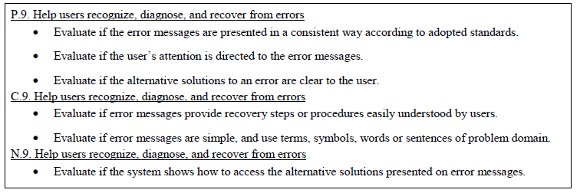
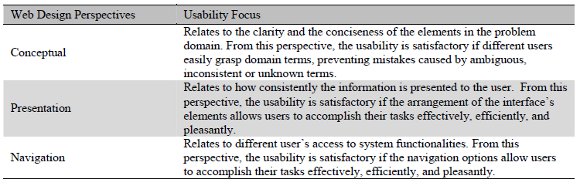
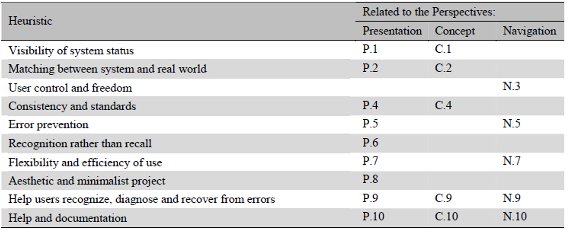
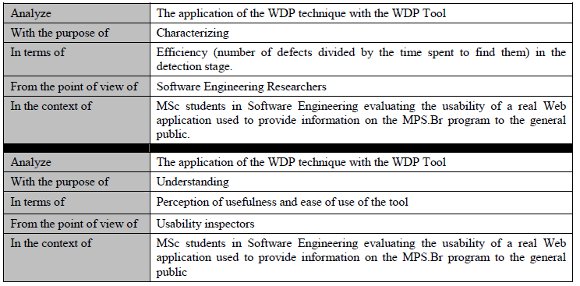
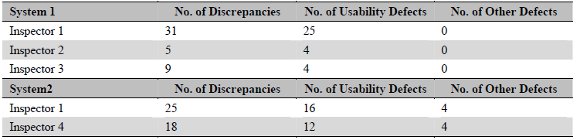
Portuguese abstract(11) standard defines usability as a set of attributes that bear on the effort needed for use, and on the individual assessment of such use, by a stated or implied set of users. In (7), De la Vara et al. carried out research on the relative importance of each of the software quality attributes. The research results revealed that most subjects considered usability the most important one. In Web applications, usability is even more important because Web applications are interactive, user-centred and based on hypermedia, where the user interface plays a central role(19). Due to the increasing importance of usability, several evaluation techniques have been proposed to improve its quality (8). An issue with usability is demand aspect, which can make the system unpleasant, inefficient, onerous, or unable to achieve the users goals in a typical configuration of use (14). The most commonly adopted methods for the detection of usability problems can be divided into two main categories: (1) Usability Inspections, in which inspectors examine some application aspects in order to identify violations of established usability principles; and (2) Usability Testing, which are evaluation methods that depend on the direct participation of users, such as: Laboratory studies, Think Aloud, and Cooperative Evaluation (2). In Usability Testing methods the usability problems are discovered by means of observation and interaction with users, while they perform tasks or provide suggestions on the interface design and its usability. In Usability Inspections, problems are discovered by usability experts guided by inspection techniques 2). Usability inspections cost less than usability testing because they only need practitioners with good usability knowledge to be performed, instead of special equipment or a laboratory (25). Different usability inspection techniques have been proposed in the technical literature, such as: Heuristic Evaluation (18), Cognitive Walkthrough (21), and Guidelines and Checklists (6). Amongst those, Heuristic Evaluation is one of the most popular 18). In Heuristic Evaluation, inspectors analyze system conformity by considering a set of heuristics representing quality patterns defined by usability experts. The WDP (Web Design Perspective-based Usability Evaluation) is an usability inspection technique based on heuristics 2). The WDP technique was developed through an empirical approach (24) to reduce the risk of transferring an immature software technology from the Academy to the industry (4). Empirical studies on the WDP technique also allowed the identification of the main difficulties inspectors faced when using the technique, such as: (1) the effort needed for a detailed description of detected usability defects; and (2) the fact that it was necessary to change the focus of attention, going from the evaluated application to the written description of WDP technique, and the evaluation report. Such issues motivated the development of tools to support the application of the WDP technique. Some tools have been proposed with this goal, such as the APIU (22), Interactive WE (9) and the WDP technique content consult assistant (10). However, we considered that the issues previously identified had not yet been fully addressed by these tools, and proposed the WDP Tool. The WDP Tool aims to support the WDP inspection process, to reduce the effort needed for its application, therefore enhancing its adherence to an industrial environment. This paper presents two observational studies using the WDP technique within the WDP Tool. The first study was conducted in vitro, with students from a software engineering MSc course at the Federal University of Rio de Janeiro. The second one was conducted in vivo, in a Brazilian brokerage firm. Both studies aim to characterize the efficiency of the WDP Tool and evaluate its feasibility when used in real software development projects. Moreover, this paper also describes how the WDP Tool has been evaluated in terms of its adequacy to an industrial environment through the TAM (Technology Acceptance Model) model (5). Studies indicate the feasibility of successfully using the WDP technique along with the WDP Tool to support usability inspections in real software projects. The remainder of this paper is organized as follows. Section 2 presents the background on usability inspections using the WDP technique, and the motivation for this research. Section 3 describes the technologies we used in the development of the WDP tool, and Section 4 presents the WDP tool and its main functionalities. In Sections 5 and 6, we describe the empirical studies evaluating the WDP tool. Moreover, Section 7 presents the results analysis regarding the perceptions of usefulness and ease of use of the WDP tool according to the TAM model 5). Then, Section 8 provides a brief comparison with related tools. Finally, we give our conclusions and future work paths in Section 9. 2 Usability Inspection with the WDP Technique 2.1 The WDP Technique According to Zhang et al. (27) it is hard for an inspector to identify all the different usability problems at the same time. In order to address this issue, Zhang et al. 27) proposed an usability inspection technique based on perspectives called Use-Based Reading (UBR), in which each inspection session focuses on a subset of usability aspects covered within a usability perspective. The hypothesis behind the use of perspectives is that, due to the focus of each perspective, each inspection session will have an increased percentage of identified usability problems related to the used perspective. Furthermore, the combination of different perspectives could assist in identifying more usability problems than the same amount of inspections sessions using a generic inspection technique 25). Combining such hypotheses with the set of usability heuristics proposed by Nielsen 18), Conte et al. 2) developed the WDP technique. Empirical results presented in 2) show that the WDP technique is significantly more effective than, and as efficient as, Nielsens Heuristic Evaluation for the inspection of Web applications. The WDP technique uses perspectives (presentation, concept, and navigation) that are proper for Web projects, and that can be used as a guide to interpret the heuristics with a specific focus on Web applications (Table 1). The combination of Heuristics (H) and Perspectives (P) allows the WDP to define HxP pairs (Table 2), in which each heuristic is analyzed under the related perspective specific focus. It is worth noting that not all associations between heuristics and perspectives make sense; therefore, in that case, there are empty cells in the table. For each HxP pair, the WDP technique defines a set of features to be evaluated. Fig. 1 shows part of the WDP technique, in which readers can view the focus difference regarding Heuristic 9 (Help users recognize, diagnose and recover from errors) according to each of the perspectives, by pairs P.9, C.9, and N.9, respectively. Table 1: Web Design Perspectives related to Usability Evaluation (3)
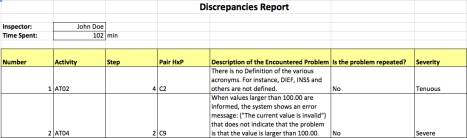
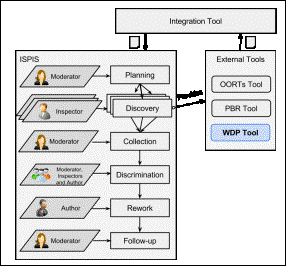
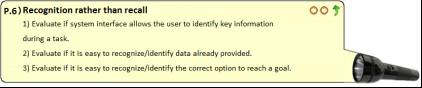
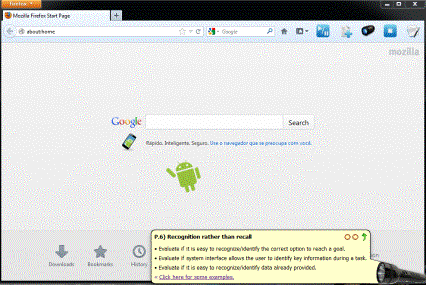
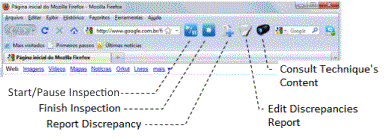
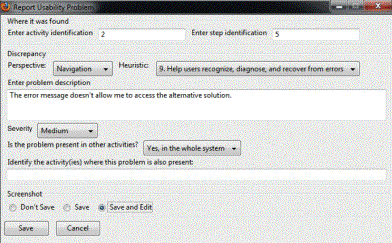
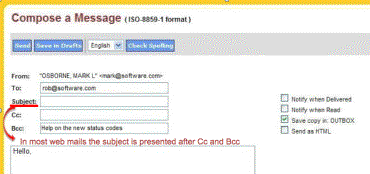
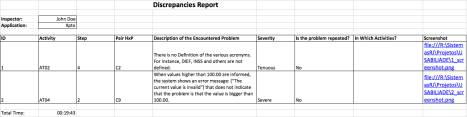
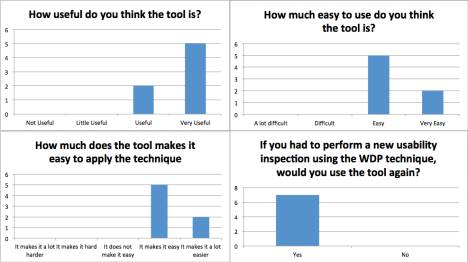
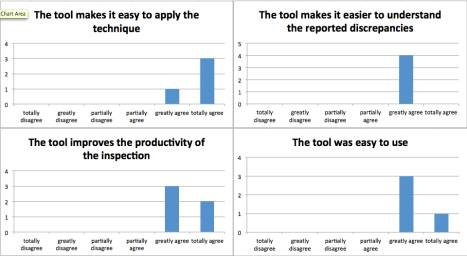
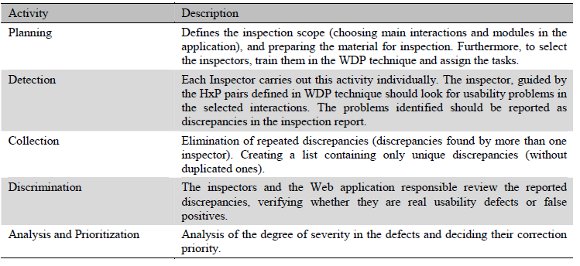
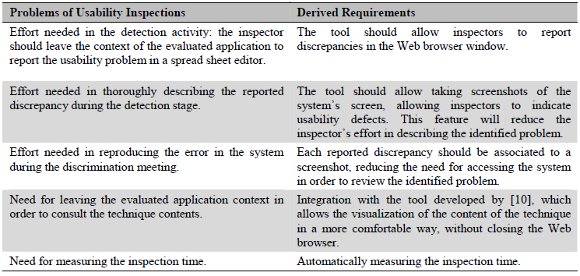
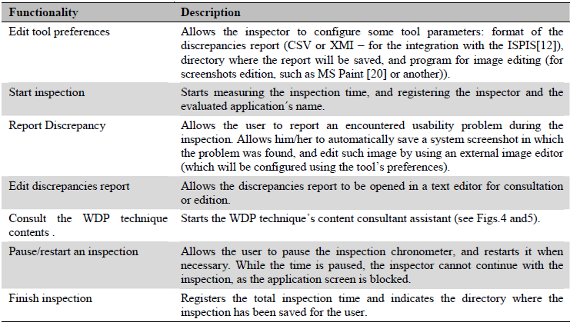
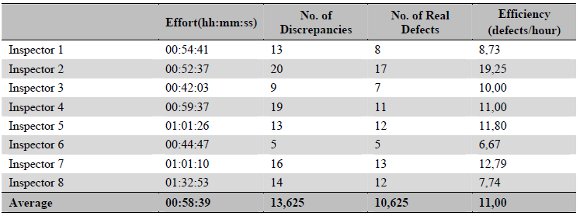
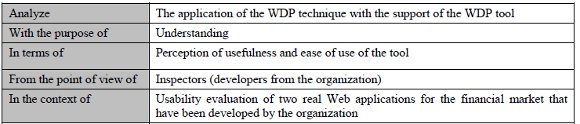
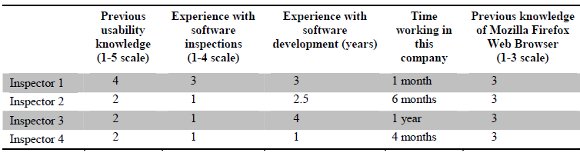
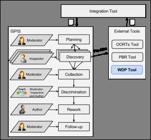
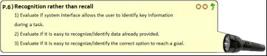
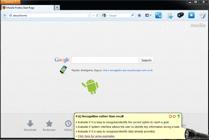
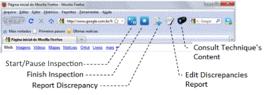
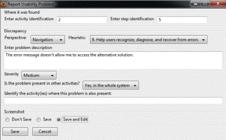
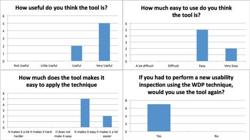
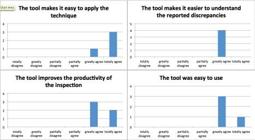
4)) 2.2 The Inspection Process using the WDP Technique The inspection process using the WDP technique is divided into five main activities based in (23). Table 3 describes each one of them. Table 3: Activities of the inspection process of the WDP technique 2)4)25) indicated that this activity was the most effort-intensive activity in the inspection process. In order to perform the detection of discrepancies, the inspector should use the following supporting material: The WDP technique description, which completely describes the technique (the complete technique description can be found in 2)). Usually, inexperienced inspectors tend to use this description to guide them through the detection activity. Nevertheless, experienced inspectors use it as a support instrument for the classification of defects. The inspection script, which identifies, in terms of activities and steps, which Web application functionalities should be inspected. The inspection script is prepared according to the inspection plan. The discrepancies report, which represents the detection activity product. It contains all the discrepancies found by the inspector in the inspected Web application. For each discrepancy, the inspector should inform: the activity from the inspection script that was being performed when he/she found the discrepancy, the step of the activity, the discrepancy classification (the HxP pair), the problem description, its repetition (if the activity gets repeated in other activities, the inspector should report which one of them), and the degree of severity (using the severity scale proposed by Nielsen 18)). Furthermore, the report should complement the information by informing the inspector ID and total inspection time, which should be measured by the inspector him/herself. Fig. 2 shows a report example. 2)4)25), we concluded that this constant context change (from the Web browser to the text editor and the report spread sheet) is one of the factors that make the detection activity tiring and subject to errors. Furthermore, the inspectors usually complain about the demanded effort to thoroughly describe each of the usability problems found. These difficulties represent our main motivation for developing the WDP Tool. We will describe the way in which the tool deals with each of these issues in Section 4. 3 Technology Bases The following technologies were used as bases for the development of the WDP Tool: Firefox: The WDP Tool aims to specifically support the inspection of Web applications. Therefore, it is interesting to integrate its tool support to a technology capable of accessing the Web. This feature aims to reduce the need for context changing in the detection activity. As a result, the WDP Tool has been developed as an extension of the Web browser. The most commonly used browsers are: Microsoft Internet Explorer (IE), Mozilla Firefox, and Google Chrome(29). Despite IE being the browser with the biggest market share, it does not offer enough resources to support developers willing to extend its functionalities. Consequently, we chose Firefox as the development basis for the WDP tool due to the support it provides for the development of its extensions, and as it is the secondly mostly used browser (15). ISPIS (Infra-estrutura de Suporte ao Processo de Inspeção de Software, or Software Inspection Process Support Infrastructure): A framework to support software inspection software that can be used by distributed teams to inspect different artefacts throughout the software development life cycle (12). The ISPIS framework provides support to all activities in the inspection process, from planning to rework and follow-up of results. However, as a generic inspection framework, it does not deal with the particularities of any specific inspection technique (such as WDP). In order to tackle this limitation, the ISPIS provides an integration mechanism, allowing discrepancies that were identified using other tools (such as the WDP tool) to be integrated into the ISPIS framework (see Fig. 3). In that sense, we found that it would be valuable to integrate the WDP Tool with the ISPIS. This integration is done through the generation of a XMI file, with all the discrepancies identified by the inspector in the detection phase (using the WDP Tool), which can be automatically loaded and used within the ISPIS framework. 12)) The WDP technique content consult assistant 10) provides access to the WDP technique description, showing its content in small parts and allowing the navigation through links, which make the reading process less tiring. The inspector may choose which perspective he/she wants to see, and pairs for this perspective are presented in numerical order. Usually HxP pairs are evaluated in this order: first the Presentation perspective pairs, as presentation is the most immediate observable characteristic of Web application interfaces; secondly, the inspector evaluates if he/she can understand what is being presented, following the Conceptual perspective HxP pairs; and finally, the inspector navigates to other pages, evaluating the Navigation perspective pairs. Although this is the suggested order, the inspector is free to follow his/her own order. For each HxP pair, the assistant shows the points that should be evaluated, links to examples and navigation buttons (see Fig. 4). This window is shown in the screen right bottom, in order to minimize its interference with the Web applications that are being inspected (see Fig. 5). Table 4). Based on these requirements, we proposed a set of functionalities to be offered by the tool (see Table 5). Fig. 6 shows the location of such functionalities in the tools menu on the browsers tool bar. The only feature we do not show in this menu is the Edit tool preferences functionality, which is shown in another browser tool bar. Table 4: Origin of WDP Tool requirements Fig. 7. It is worth pointing that, after describing the encountered problem, the user can either: (1) not save, (2) save, and (3) save and edit an image of the window in which the discrepancy was found. Then, the system will automatically take a screenshot and save it in the inspection directory. If the user selects the Save and Edit option, the system will also open the file containing the screenshot with an external image editor. In this case, the inspector can make drawings and marks that can indicate and facilitate the understanding of the discrepancy (see Fig. 8). Fig. 9 shows an example of a report created by the tool in the CSV format. The images saved for each discrepancy are shown in the report through links that point to the related image file. (28) under the Mozilla Public License Version 1.1(16) license for those interested in its use. 5 First Observational Study We carried out two empirical studies to evaluate the WDP Tool. In these studies we aimed to observe the feasibility of the WDP Tool application to support usability inspections, using the WDP technique. We carried out the first empirical study in vitro, with eight Software Engineering MSc students who carried out an inspection in the MPS.Br (17) website. None of the subjects had previous experience with usability inspections. All subjects received the same training and the same inspection script. Each subject inspected the system individually, using the WDP technique along with the WDP Tool. The goals of this first study are described using the GQM (Goal Question Metric) paradigm (1) shown in Table 6. Table 6: Goals of the first empirical study (GQM based) Table 3). We have summarized the collected data in Table 7. Table 7: Quantitative results from the first empirical study Fig. 10 shows the qualitative results from this study. We collected the qualitative data in this study through the subjects answers to a follow-up questionnaire to evaluate two aspects: (a) perceived usefulness: the degree in which a person believes that the technology could improve his/her performance at work, and (b) perceived ease of use: the degree in which a person believes that using a specific technology would be effortless (13). Seven out of eight subjects answered the questionnaire. For each questionnaire we used a four level Likert scale. We did not use a five level Likert scale with an intermediate level, as suggested by 13), as this neutral level does not provide information regarding the side to which the subjects is inclined (either positive or negative). We can see that the subjects had positive answers regarding the usefulness and ease of use of the tool. Furthermore, all subjects stated that they would use the tool again if they were to perform another usability inspection using the WDP technique. Table 8. Table 8: Goals from the second empirical study Table 9 presents subject characterization and Table 10 shows the quantitative results from this study. It is worth noting that one of the subjects did not carry out the inspection in System 2. This inspector was allocated to another task during the study execution and was not able to participate in the inspection. Furthermore, System 2 presented some functional defects that were not related to usability, but that were identified during the inspection. Therefore, we have separated the identified defects in usability problems and other problems (see Table 10). The overall inspection allowed the identification of 33 unique defects in System 1, and 31 unique defects in System 2 (please note that the sum of defects per inspector is greater than the total number of unique defects in System 2, as some defects where pointed out by more than one inspector). The company used these results to improve the quality of its applications. Table 9: Inspector Characterization 5), has been applied in the evaluation of several new technologies (26). We used this model as a basis for the qualitative analysis in this second study, aiming to evaluate the indicators of perceived usefulness and ease of use. The reason for focusing on these indicators is that, according to Davis 5), these aspects are strongly correlated to user acceptance. In this second observational study we prepared a post-inspection questionnaire, which was based in the questionnaires applied by Conte et al. 4). In this questionnaire, the subjects had to answer how much they agreed with each of the statements regarding the tools usefulness: (i) the tool improves the productivity of the inspection; (ii) the tool makes facilitates the application of the technique; (iii) the tool makes it easier to understand the reported discrepancies. They also indicated their agreement with the statements regarding the tools ease of use: (i) the tool was easy to use. In order to assess the degree of agreement, the inspectors selected one of the following values from a Likert scale: (1) totally disagree, (2) greatly disagree, (3) partially disagree, (4) partially agree, (5) greatly agree, and (6) totally agree. Fig. 11 shows the overall results from the questionnaire. 22), Santos and Conte presented the APIU (Apoio ao Processo de Inspeção de Usabilidade, or Support to the Usability Inspection Process) tool that supports the usability inspection process. The APIU, differently from the WDP Tool, aims to support the overall inspection process, from the planning to the prioritization and correction of the encountered defects. As the main advantage of using the WDP Tool over the APIU tool, we can say that, as the WDP Tool is integrated to the browser, it allows an easier interaction, enabling inspectors to report the discrepancies without leaving the application context they are inspecting. Furthermore, despite the fact that the APIU allows the inspector to upload an image to show the identified discrepancy, it is not able to automatically take a screenshot as in the WDP Tool. In 9), Fernandez et al. proposed the Interactive Web Evaluation (Interactive WE) tool. The Interactive WE supports the inspection process of the Web Evaluation Question Technique (WE-QT), a derivation of the WDP technique in the shape of questions to assist novice inspectors. As the WDP Tool, the Interactive WE supports the defect detection phase, albeit with the use of another technique. The main advantage of using the WDP Tool over the Interactive WE is its integration with the Web browser. Furthermore, despite being able to capture the system screen, this screen shot always grabs the whole screen and not the inspected application. Furthermore, the Interactive WE does not allow inspectors to edit the screen shot to point the identified defect, which makes the information less specific. Finally, the report generated by the Interactive WE is in text format and does not provide links to the screen shots, which is a feature that is supported by the WDP tool. 9 Conclusion This paper presented the empirical evaluation of a tool to support usability inspections, the WDP Tool. This tool aims to solve the issues regarding the application of the WDP technique. The results from the observational studies offer a positive indication on the WDP tool´s feasibility when used in an industrial environment. We hope such indications can encourage its use by practitioners in the software development industry. The main contribution of this work is to identify and solve the main issues in the WDP technique application by offering the WDP tool. Furthermore, the WDP tool can also be used integrated with other tools for software inspections (such as ISPIS) or the WDP technique (WDP content consult assistant), extending their functionalities and increasing their potential use. As future work we intend to increase the possibilities of using the WDP Tool by: (1) developing tool versions for different browsers, and (2) doing more empirical studies to compare the inspection efficiency among inspection teams using and not using the WDP tool. In these studies, it will be also important to compare not only the detection phase efficiency, but also the discrimination and defect correction phases. The reason for these comparisons is the screenshot capability, which can facilitate the understanding of discrepancies and reduce the effort needed in other inspection stages.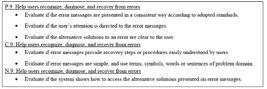


Acknowledgementsth anniversary of COPPE (1963-2013), the Graduate School of Engineering of the Federal University of Rio de Janeiro. Furthermore, we would like to thank Miguel Lannes Fernandes for the opportunity he gave us, allowing us to carry out the in vivo study in his firm, as well as CNPq, FAPEAM, and the COPPETEC Foundation/SIGIC Project for their valuable support in the development of the WDP tool.
References
References
- (1) V. Basili, and D. Rombach, The tame project: towards improvement-oriented software environments," IEEE Transactions on Software Engineering, vol. 14, no. 6, pp. 758 - 773,1988.
- (2) T. Conte, J. Massolar, E. Mendes, G. H. Travassos, Web Usability Inspection Technique Based on Design Perspectives, IET Software Journal, v. 3, n. 2, pp. 106-123, 2009.
- (3) T. Conte, V. Vaz, J. Massolar, E. Mendes, and G. Travassos,Improving a Web Usability Inspection Technique using Qualitative and Quantitative Data from an Observational Study, in Proc. XXIII Brazilian Symposium on Software Engineering SBES, Fortaleza - Brazil, 2009, pp. 227-235.
- (4) T. Conte, V. Vaz, D. Zanetti, G. Santos, A. Rocha, and G. Travassos, Applying the Technology Acceptance Model to a Usability Inspection Technique, in: Proc. IX Brazilian Symposium on Software Quality SBQS, Belém, 2010, pp. 367-374. (in Portuguese)
- (5) F.Davis, "Perceived usefulness, perceived ease of use, and user acceptance of Information Technology,"MIS Quarterly, vol. 13, no. 3, pp. 319-339, 1989.
- (6) A. Dix, J. Finlay, G. Abowd, R. Beale, Human-Computer Interaction, Ed. Pearson/ Prentice Hall, 3rd Ed., 2004.
- (7) J. de la Vara, K. Wnuk, R. Berntsson-Svensson, J. Sánchez, and B. Regnell, An Empirical Study on the Importance of Quality Requirements in Industry,in: XXIII International Conference on Software Engineering and Knowledge Engineering - SEKE 2011, Miami Beach, USA, 2011, pp. 438 - 443.
- (8) A. Fernandez, E. Insfran, S. Abrahao, Usability evaluation methods for the Web: A systematic mapping study. Information and Software Technology, Volume 53, Issue 8, 2011.
- (9) P. Fernandes, L. Rivero, B. Bonifacio, D. Santos and T. Conte, Evaluating a new Approach for Usability Inspection through a Qualitative and Quantitative Analysis, in Proc.VIII Experimental Software Engineering Latin American Workshop, Rio de Janeiro, 2011. (in Portuguese)
-
mso-bookmark:_Ref193258919'>
» www.softex.br/mpsbr - (10) J. Francese, Development of a Tool Support for the Usability Defects Detection in Web Systems, in Proc. Jornada Giulio Massarani de Iniciação Científica, Artística e Cultural JIC, Rio de Janeiro - Brazil, 2008.(in Portuguese)
- (11) International Organization for Standardization - ISO/IEC 9126-1, Information Technology Software Product Quality. Part 1: Quality Model, 1999.
- (12) M. Kalinowski, and G. Travassos, A Computational Framework for Supporting Software Inspections, in Proc. XIX IEEE Conference on Automated Software Engineering, Linz Austria, 2004, pp. 46-55.
- (13) O. Laitenberger, and H. Dreyer, Evaluating the Usefulness and the Ease of Use of a Web-based Inspection Data Collection Tool, in: Proc. X Software Metrics Symposium, Bethesda MD, 1998, pp. 122-132.
- (14) D. Lavery, G. Cockton, and M. Atkinson, Comparison of evaluation methods using structured usability problem reports, Behaviour & Information Technology, vol. 16, no. 4, pp. 246 266, 1997.
-
(15) Mozilla Developer Center Extensions. Available at: https://developer.mozilla.org/en-US/docs/Extensions(last access 15/02/2013)
» https://developer.mozilla.org/en-US/docs/Extensions - mso-bookmark:_Ref348301215'>.
-
(16) Mozilla Public License Version 1.1. Available at:http://www.mozilla.org/MPL/1.1/ (last access 16/03/2012)
» http://www.mozilla.org/MPL/1.1/ -
mso-bookmark:_Ref348301329'>.
» http://w3counter.com/globalstats.php - mso-bookmark:_Ref348301364'>.
- (18) J. Nielsen, Heuristic evaluation, J. Nielsen, and R. Mack, (Eds.), John Wiley & Sons, 1994, Usability Inspection Methods, 1994.
- (19) L. Olsina, G. Covella, and G. Rossi, Web Quality,E. Mendes, andN. Mosley (Eds), Web Engineering, Springer Verlag, 2006.
-
(20) Paint Microsoft Windows. Available at: http://windows.microsoft.com/en-US/windows7/products/features/paint (last access 15/02/2013).
» http://windows.microsoft.com/en-US/windows7/products/features/paint - (21) P. Polson, C. Lewis, J. Rieman, C. Wharton, Cognitive Walkthroughs: a method for theory-based evaluation of users interfaces, in International Journal of Man-Machine Studies, 1992.
- (22) F. Santos, and T. Conte, Evolving na Assistant for Usability Inspection through Empirical Studies, in Proc. XIV Iberian-American Congress in Software Engineering CibSE, Rio de Janeiro, 2011, pp 23. (in Portuguese)
- mso-bookmark:_Ref193191968'>
- (23) C. Sauer, D. Jeffery, L. Land, and P. Yetton, The Effectiveness of Software Development Technical Review: A Behaviorally Motivated Program of Research,IEEE TSE, vol. 26, no. 1, pp. 1-14, 2000.
- (24) F. Shull, J. Carver, and G. Travassos, An empirical methodology for introducing software processes,ACM SIGSOFT Software Engineering Notes, vol. 26, no. 5, pp. 288-296, 2001.
- (26) V.Venkatesh, M. Morris, and D. Davis, User acceptance of information technology: Towards an unified view,MIS Quarterly, vol. 27, no. 3, pp. 425-478, 2003.
-
(28) WDPTool: Add-ons for Firefox. Available at: https://addons.mozilla.org/en-us/firefox/addon/wdp-tool/ (last access 15/02/2013)
» https://addons.mozilla.org/en-us/firefox/addon/wdp-tool/ - mso-bookmark:_Ref348301320'>.