<?xml version="1.0" encoding="ISO-8859-1"?><article xmlns:mml="http://www.w3.org/1998/Math/MathML" xmlns:xlink="http://www.w3.org/1999/xlink" xmlns:xsi="http://www.w3.org/2001/XMLSchema-instance">
<front>
<journal-meta>
<journal-id>0717-5000</journal-id>
<journal-title><![CDATA[CLEI Electronic Journal]]></journal-title>
<abbrev-journal-title><![CDATA[CLEIej]]></abbrev-journal-title>
<issn>0717-5000</issn>
<publisher>
<publisher-name><![CDATA[Centro Latinoamericano de Estudios en Informática]]></publisher-name>
</publisher>
</journal-meta>
<article-meta>
<article-id>S0717-50002013000300008</article-id>
<title-group>
<article-title xml:lang="en"><![CDATA[Production Framework for Full Panoramic Scenes with Photorealistic Augmented Reality]]></article-title>
</title-group>
<contrib-group>
<contrib contrib-type="author">
<name>
<surname><![CDATA[Felinto]]></surname>
<given-names><![CDATA[Dalai Quintanilha]]></given-names>
</name>
<xref ref-type="aff" rid="A01"/>
</contrib>
<contrib contrib-type="author">
<name>
<surname><![CDATA[Zang]]></surname>
<given-names><![CDATA[Aldo René]]></given-names>
</name>
<xref ref-type="aff" rid="A01"/>
</contrib>
<contrib contrib-type="author">
<name>
<surname><![CDATA[Velho]]></surname>
<given-names><![CDATA[Luiz]]></given-names>
</name>
<xref ref-type="aff" rid="A01"/>
</contrib>
</contrib-group>
<aff id="A01">
<institution><![CDATA[,Fisheries Centre University of British Columbia Vancouver. Canada]]></institution>
<addr-line><![CDATA[ ]]></addr-line>
</aff>
<aff id="A02">
<institution><![CDATA[,Visgraf Laboratory Institute of Pure and Applied Mathematics Rio de Janerio. Brazil]]></institution>
<addr-line><![CDATA[ ]]></addr-line>
</aff>
<pub-date pub-type="pub">
<day>00</day>
<month>12</month>
<year>2013</year>
</pub-date>
<pub-date pub-type="epub">
<day>00</day>
<month>12</month>
<year>2013</year>
</pub-date>
<volume>16</volume>
<numero>3</numero>
<fpage>8</fpage>
<lpage>8</lpage>
<copyright-statement/>
<copyright-year/>
<self-uri xlink:href="http://www.scielo.edu.uy/scielo.php?script=sci_arttext&amp;pid=S0717-50002013000300008&amp;lng=en&amp;nrm=iso"></self-uri><self-uri xlink:href="http://www.scielo.edu.uy/scielo.php?script=sci_abstract&amp;pid=S0717-50002013000300008&amp;lng=en&amp;nrm=iso"></self-uri><self-uri xlink:href="http://www.scielo.edu.uy/scielo.php?script=sci_pdf&amp;pid=S0717-50002013000300008&amp;lng=en&amp;nrm=iso"></self-uri><abstract abstract-type="short" xml:lang="en"><p><![CDATA[The novelty of our proposal is the end-to-end solution to combine computer generated elements and captured panoramas. This framework supports productions specially aimed at spherical displays (e.g., fulldomes). Full panoramas are popular in the computer graphics industry. However their common usage on environment lighting and reflection maps are often restrict to conventional displays. With a keen eye in what may be the next trend in the filmmaking industry, we address the particularities of those productions, exploring a new representation of the space by storing the depth together with the light map, in a full panoramic light-depth map.]]></p></abstract>
<abstract abstract-type="short" xml:lang="pt"><p><![CDATA[A contribui cão original deste trabalho é a solu cão de ”ponta a ponta” para mesclar panoramas capturados e elementos gerados por computador. A metodologia desenvolvida suporta produ cões destinadas especialmente à telas esféricas (por exemplo, domos imersivos). Panoramas têm sido utilizados em computa cão gráfica durante anos, no entanto, seu uso geralmente limita-se a mapas de ilumina cão e mapeamentos de reflexao para telas convencionais. De olho no que pode ser a próxima tendência na indústria de cinema, nós abordamos as peculiaridades deste formato e exploramos uma nova representa cão espacial combinando a profundidade da cena com o mapa de luz HDR. O resultado é um mapa panorâmico de luz e profundidade (full panoramic light-depth map).]]></p></abstract>
<kwd-group>
<kwd lng="en"><![CDATA[full panorama]]></kwd>
<kwd lng="en"><![CDATA[photorealism]]></kwd>
<kwd lng="en"><![CDATA[augmented reality]]></kwd>
<kwd lng="en"><![CDATA[photorealistic rendering]]></kwd>
<kwd lng="en"><![CDATA[hdri, light-depth]]></kwd>
<kwd lng="en"><![CDATA[ibl illumination]]></kwd>
<kwd lng="en"><![CDATA[fulldome]]></kwd>
<kwd lng="en"><![CDATA[3d modeling]]></kwd>
<kwd lng="pt"><![CDATA[Panorama completo]]></kwd>
<kwd lng="pt"><![CDATA[otorealismo]]></kwd>
<kwd lng="pt"><![CDATA[realidade aumentada]]></kwd>
<kwd lng="pt"><![CDATA[renderiza cão fotorealista]]></kwd>
<kwd lng="pt"><![CDATA[luz com canal de profundidade]]></kwd>
<kwd lng="pt"><![CDATA[ilumina cão baseada em imagens]]></kwd>
<kwd lng="pt"><![CDATA[domos]]></kwd>
<kwd lng="pt"><![CDATA[modelagem 3d]]></kwd>
</kwd-group>
</article-meta>
</front><body><![CDATA[ <div class="maketitle">                                                                                                                                                                                                                                                                                                                                                                          <b><font face="Verdana" size="4">Production Framework for Full Panoramic Scenes with Photorealistic Augmented Reality</font></b>    <div class="author" >    <font face="Verdana" size="2"> <span  class="ptmb7t-x-x-120">Dalai Quintanilha Felinto</span> <br />      <span  class="ptmr7t-x-x-120">Fisheries Centre, University of British Columbia, </span><span class="thank-mark"><a  href="#tk-1"><span  class="ptmr8c-x-x-120">*</span></a></span> <br />                     <span  class="ptmr7t-x-x-120">Vancouver, Canada</span> <br />            <span  class="ptmri7t-x-x-120"><a href="mailto:dfelinto@gmail.com">dfelinto@gmail.com</a> </span><br class="and" /><span  class="ptmb7t-x-x-120">Aldo René Zang</span> <br /> <span  class="ptmr7t-x-x-120">Visgraf Laboratory, Institute of Pure and Applied Mathematics,</span> <br />                    <span  class="ptmr7t-x-x-120">Rio de Janeiro, Brazil</span> <br />                 <span  class="ptmri7t-x-x-120"><a href="mailto:zang@impa.br">zang@impa.br</a> </span><br class="and" /><span  class="ptmb7t-x-x-120">Luiz Velho</span> <br /><span  class="ptmr7t-x-x-120">Visgraf Laboratory, Institute of Pure and Applied Mathematics, </span><span class="thank-mark"><a  href="#tk-2"><span  class="ptmr8c-x-x-120">&#8224;</span></a></span> <br />                    <span  class="ptmr7t-x-x-120">Rio de Janeiro, Brazil</span> <br />                      <span  class="ptmri7t-x-x-120"><a href="mailto:lvelho@impa.br">lvelho@impa.br</a></span><br /> </font></div><font face="Verdana" size="2"><br /> </font>     <div class="date" ></div>        <div class="thanks" ><font face="Verdana" size="2"><br /><a   id="tk-1"></a><span class="thank-mark"><span  class="ptmr8c-">*</span></span> The work was supported through the NF-UBC Nereus Program, a collaborative initiative conducted by the Nippon Foundation, the University of British Columbia, and five additional partners, aimed at contributing to the global establishment of sustainable fisheries.<br /><a   id="tk-2"></a><span class="thank-mark"><span  class="ptmr8c-">&#8224;</span></span>The research was made possible with the technical and financial support from the Visgraf, Vision and Graphics Laboratory at IMPA.</font></div></div>        <div  class="abstract"  >     <div class="center"  > <!--l. 171-->    <p >     <div class="minipage">    <div class="center"  > <!--l. 171-->    <p > <font face="Verdana" size="2"> <!--l. 171--></font>    ]]></body>
<body><![CDATA[<p ><font face="Verdana" size="2"><span  class="ptmb7t-">Abstract</span></font></div> <!--l. 172-->    <p ><font face="Verdana" size="2">The novelty of our proposal is the end-to-end solution to combine computer generated elements and captured panoramas. This framework supports productions specially aimed at spherical displays (e.g., fulldomes). Full panoramas are popular in the computer graphics industry. However their common usage on environment lighting and reflection maps are often restrict to conventional displays. With a keen eye in what may be the next trend in the filmmaking industry, we address the particularities of those productions, exploring a new representation of the space by storing the depth together with the light map, in a full panoramic light-depth map. <!--l. 174--></font>    <p ><font face="Verdana" size="2">Portuguese abstract <!--l. 176--></font>    <p ><font face="Verdana" size="2">A contribui cão original deste trabalho é a solu cão de &#8221;ponta a ponta&#8221; para mesclar panoramas capturados e elementos gerados por computador. A metodologia desenvolvida suporta produ cões destinadas especialmente à telas esféricas (por exemplo, domos imersivos). Panoramas têm sido utilizados em computa cão gráfica durante anos, no entanto, seu uso geralmente limita-se a mapas de ilumina cão e mapeamentos de reflexao para telas convencionais. De olho no que pode ser a próxima tendência na indústria de cinema, nós abordamos as peculiaridades deste formato e exploramos uma nova representa cão espacial combinando a profundidade da cena com o mapa de luz HDR. O resultado é um mapa panorâmico de luz e profundidade (full panoramic light-depth map). </font> </div></div> </div>  </p>     <p align="center"> <font face="Verdana" size="2"> <a name="f1">  <img src="/img/revistas/cleiej/v16n3/3a08f1.jpg"> </a> </font> </p>  <!--l. 185-->    <p ><font face="Verdana" size="2"><span  class="ptmb7t-">Keywords: </span>full panorama, photorealism, augmented reality, photorealistic rendering, hdri, light-depth, ibl illumination, fulldome, 3d modeling. <!--l. 187--></font>    <p >   <font face="Verdana" size="2">Portuguese keywords: Panorama completo, fotorealismo, realidade aumentada, renderiza cão fotorealista, luz com canal de profundidade, ilumina cão baseada em imagens, domos, modelagem 3d. <!--l. 190--></font>    <p >   <font face="Verdana" size="2">Received: 2013-03-01, Revised: 2013-11-05 Accepted: 2013-11-05      </font>        <p><font face="Verdana" size="2"><span class="titlemark">1    </span> <a   id="x1-10001"></a>Introduction</font></p> <!--l. 3-->    <p ><font face="Verdana" size="2">The realm of digital photography opens the doors for the artist work with (pre/post)filters and other artifices where long gone are the days constrained by the physical nature of the film - ISO, the natural lighting, and so on. As creative artists we can not stand to merely capture the environment that surrounds us. We urge to interfere with our digital carving toolset. There comes the computer, guided by the artist eyes to lead this revolution. The photo-video production starts and often ends in its digital form. Ultimately those are pixels we are producing. And as such, a RGB value is just as good whether it comes from a film sensor or a computer render. But in order to merge the synthetic and the captured elements, we need to have them in the same space. Since we can not place our rendered objects in the real world, we teleport the environment inside the virtual space of the computer. Thus the first part of our project is focused on better techniques for environment capturing, and reconstruction. <!--l. 5--></font>    ]]></body>
<body><![CDATA[<p >   <font face="Verdana" size="2">We also wants to work with what we believe is a future for cinema innovation. Panorama movies and experiments are almost as old as the cinema industry. Yet, this medium has not been explored extensively by film makers. One of the reasons being the lack of rooms to bring in the audience for their shows. Another is the time it took for the technology to catch up with the needs of the panorama market. Panorama films are designed to be enjoyed in screens with large field of views (usually <img  src="/img/revistas/cleiej/v16n3/3a080x.png" alt="180&#x2218; "  class="math" >). And for years, around the world, there were only a few places designed to receive those projections (e.g. La Géode, in Paris, France). In the past years a lot of planetariums are upgrading their old star-projectors to full digital projection systems. Additionally, new panorama capture devices are becoming more accessible everyday (e.g., Lady Bug, a camera that captures a full <span  class="ptmri7t-">HDR </span>panorama in motion). And what to say of new gyroscope friendly consumer devices and applications such as Google Street View, and the recent released Nintendo Wii U Panorama View? <!--l. 8--></font>    <p >   <font face="Verdana" size="2">Those numerous emerging technologies are producing a considerable increase in the demand in different segments of the industry and entertaining. The industry is craving for immersive experiences. The overall increase in interest on the field of panorama productions brings new opportunities for the computer graphics industry to address new and revisit old problems to attend the specific needs of those media. <!--l. 10--></font>    <p >   <font face="Verdana" size="2">Our research started motivated by these new airs. We wanted to validate a framework to work from panorama capturing, the insertion of digital elements to build a narrative, and to bring it back to the panorama space. There is no tool in the market right now ready to account for the complete framework. <!--l. 12--></font>    <p >   <font face="Verdana" size="2">The first problem we faced was that full panoramas are directional maps. They are commonly used in the computer graphics industry for environment lighting and limited reflection maps. And they work fine if you are to use them without having to account for a full coherent space. However, if a full panorama is the output format, we need more than the previous works can provide. <!--l. 14--></font>    <p >   <font face="Verdana" size="2">Our proposal for this problem is a framework for photo-realistic panorama rendering of synthetic objects inserted in a real environment. We chose to generate the depth of the relevant environment geometry to a complete simulation of shadows and reflections of the environment and the synthetic elements. We are calling this a <span  class="ptmri7t-">light-depth environment</span> <span  class="ptmri7t-">map</span>. <!--l. 16--></font>    <p >   <font face="Verdana" size="2">As part of the work we extended the open source software <span  class="ptmri7t-">ARLuxrender </span><span class="cite">&#x00A0;[<a  id="bXzang11"> </a><a  href="#Xzang11">1</a>]</span> <span class="cite">&#x00A0;[<a  id="bXarlux"> </a><a  href="#Xarlux">2</a>]</span>, which allows for physically based rendering of virtual scenes. Additionally an add-on for the 3d open source software <span  class="ptmri7t-">Blender </span>was developed. All the tools required for the presented framework are open source. This reinforce the importance of producing authoring tools that are accessible for artists worldwide and also present solutions that can be implemented elsewhere, based on the case-study presented here. Additional information about this framework can be found in the <span  class="ptmri7t-">ARLuxrender </span>project web site <span class="cite">&#x00A0;[<a  id="bXarlux"> </a><a  href="#Xarlux">2</a>]</span>. <!--l. 1--></font>    <p >        <p><font face="Verdana" size="2"><span class="titlemark">2    </span> <a   id="x1-20002"></a>Related Work</font></p> <!--l. 3-->    <p ><font face="Verdana" size="2">If we consider a particular point in the world, the light field at this point can be described as the set of all the colors and light intensities reaching the point from all directions. A relatively simple way to capture this light field is by taking a picture of a mirror ball centered in this point in space - the mirror ball will reflect all the environment lights that would reach that point towards the camera. There are other techniques for capturing omnidirectional                                                                                                                                                                                     images including the use of fisheye lens, a mosaic of views, and special panoramic cameras. But even though there are multiple methods and tools to capture the environment lighting, this was not the case in our recent history. <!--l. 5--></font>    <p >   <font face="Verdana" size="2">The simplest example of image based illumination dates from the beginning of the 80ies. The technique is known as environment mapping or reflection mapping. In this technique, a photography of a mirror ball is taken and directly transferred to the synthetic object as a texture. The application of the technique using photographies of a real scene was independently tested by Gene Miller <span class="cite">&#x00A0;[<a  id="bXHOFFMAN84"> </a><a  href="#XHOFFMAN84">3</a>]</span> and Mike Chou <span class="cite">&#x00A0;[<a  id="bXWILLIAMS83"> </a><a  href="#XWILLIAMS83">4</a>]</span>. Right after, the technique started to get adopted by the movie industry with the work of Randal Kleiser in the movie <span  class="ptmri7t-">Flight of the Navigator </span>in 1986, and the robot <span  class="ptmri7t-">T1000 </span>from the movie <span  class="ptmri7t-">Terminator 2</span> directed by James Cameron in 1991. This technique proved successful for environment reflections, but limited when it comes to lighting - the capture image had a low dynamic range (LDR) insufficient to represent all the light range present in the original environment. <!--l. 8--></font>    ]]></body>
<body><![CDATA[<p >   <font face="Verdana" size="2">Debevec and Malik developed a technique for recovering high dynamic range radiance maps from a set of photographies taken with a conventional camera, <span class="cite">&#x00A0;[<a  id="bXDeb97"> </a><a  href="#XDeb97">5</a>]</span>. Many shots are taken with a variance of the camera exposure between them. After the camera response is calculated, the low dynamic range images are stacked into a single high dynamic range image (or <span  class="ptmri7t-">HDRI</span>) that represents the real radiance of the scene. We use this technique to assemble our environment map. <!--l. 10--></font>    <p >   <font face="Verdana" size="2">In 1998, Debevec presented a method to illuminate synthetic objects with lighting captured from the real world, <span class="cite">&#x00A0;[<a  id="bXdeb98"> </a><a  href="#Xdeb98">6</a>]</span>. This technique became known as <span  class="ptmri7t-">IBL </span>- Image Based Lighting. The core idea behind <span  class="ptmri7t-">IBL </span>is to use the global illumination from the captured image to simulate the lighting of synthetic objects seamlessly merged within the photography. <!--l. 12--></font>    <p >   <font face="Verdana" size="2">Zang expanded Debevec&#8217;s work in synthetic object rendering developing an one-pass rendering framework, dispensing the needs of post-processing composition, <span class="cite">&#x00A0;[<a  id="bXzang11"> </a><a  href="#Xzang11">1</a>]</span>. In the same year (2011), Karsch presented a relevant work on rendering of synthetic objects in legacy photographies, using a different method for recovering the light sources of the scene, <span class="cite">&#x00A0;[<a  id="bXKarsch:SA2011"> </a><a  href="#XKarsch:SA2011">7</a>]</span>. <!--l. 17--></font>    <p >   <font face="Verdana" size="2">As for panoramic content creation, important work was developed in the past for real-time content in domes by Paul Bourke <span class="cite">&#x00A0;[<a  id="bXfelinto10"> </a><a  href="#Xfelinto10">8</a>]</span>. Part of our work is inspired on his multiple ideas on full dome creation, and the work of Felinto in 2009, implementing Bourke&#8217;s real-time method in <span  class="ptmri7t-">Blender </span><span class="cite">&#x00A0;[<a  id="bXbge"> </a><a  href="#Xbge">9</a>]</span> and proposing other applications for panorama content in architecture visualization, <span class="cite">&#x00A0;[<a  id="bXfelinto09"> </a><a  href="#Xfelinto09">10</a>]</span>. <!--l. 1--></font>    <p >        <p><font face="Verdana" size="2"><span class="titlemark">3    </span> <a   id="x1-30003"></a>The Framework</font></p> <!--l. 3-->    <p ><font face="Verdana" size="2">The framework here presented focus on photo-realistic panorama productions that require the combination of synthetic and captured elements. This framework is compound by the following parts: <!--l. 31--></font>    <p >      <ol  class="enumerate1" >      <li    class="enumerate" id="x1-3002x1"><font face="Verdana" size="2">Environment capture and panorama assembling      </font>      </li>      <li    class="enumerate" id="x1-3004x2"><font face="Verdana" size="2">Panorama calibration      </font>      </li>      <li    class="enumerate" id="x1-3006x3"><font face="Verdana" size="2">Environment mesh construction      </font>      </li>      <li    class="enumerate" id="x1-3008x4"><font face="Verdana" size="2">Movie making      </font>      </li>      <li    class="enumerate" id="x1-3010x5"><font face="Verdana" size="2">Final rendering</font></li>    </ol> <!--l. 39-->    <p >   <font face="Verdana" size="2">Some of the steps hereby presented can be accomplished in a multitude of ways. For the scope of this essay we decided to present the specific implications of the implementations needed for a particular project. As a general principal we elected to implement the framework using only technology and equipment reasonably available for most artists. <!--l. 41--></font>    ]]></body>
<body><![CDATA[<p >   <font face="Verdana" size="2">We must emphasize, however, that existing industrial equipment and technology can largely facilitates some parts of this framework. There are professional industrial-level equipment which can compress the steps of capturing, reconstructing and calibrating an environment into a single step <!--l. 43--></font>    <p >   <font face="Verdana" size="2">In the following sections, we present in details the implementation we adopted for our test project and case study.                                                                                                                                                                                     <!--l. 45--></font>    <p >        <p><font face="Verdana" size="2"><a   id="x1-40003"></a>Environment capture and panorama assembling</font></p> <!--l. 47-->    <p ><font face="Verdana" size="2">There are several methods and special equipments that can capture and assemble a full <span  class="ptmri7t-">HDR </span>panoramic image. For instance one can use a special <span  class="ptmri7t-">HDR </span>panoramic camera such as Lady Bug, which can capture the <span  class="ptmri7t-">HDR </span>panorama with a single shot. It is important to keep in mind that the framework is flexible and the user can choose the best technique for the specific needs of a production even if constrained by the equipment available. We decide to use a semi-professional camera with fisheye lens and an open source software to assembly the panoramas. The basic steps to produce an <span  class="ptmri7t-">HDR </span>panorama with this method are: </font>      <ul class="itemize1">      <li class="itemize"><font face="Verdana" size="2">Placement of the camera in strategic spots      </font>      </li>      <li class="itemize"><font face="Verdana" size="2">Capture of photos to fill a <img  src="/img/revistas/cleiej/v16n3/3a081x.png" alt="360&#x2218;&#x00D7; 180&#x2218; "  class="math" > field of view      </font>      </li>      <li class="itemize"><font face="Verdana" size="2">Stack the individual <span  class="ptmri7t-">HDR </span>images </font>      </li>      <li class="itemize"><font face="Verdana" size="2">Stitching of the panorama image</font></li>    </ul> <!--l. 58-->    <p >        <p><font face="Verdana" size="2"><a   id="x1-50003"></a>Panorama calibration</font></p> <!--l. 60-->    <p ><font face="Verdana" size="2">One of the most important steps on our framework is to obtain a proper representation of the environment. The environment is used for the lighting reconstruction of the scene, the calibration of the original camera device, the background plate for our renders and for the scene depth reconstruction. We settled for a industry de facto image format known as equirectangular panorama <span  class="ptmri7t-">HDR </span>images. This is a 2:1 image that encompass the captured light field. We also implemented a plugin to assist the user to rotate and accommodate the panorama in the desired position to be used in the production stage. This will be presented in more details in the next sections. <!--l. 65--></font>    <p >        ]]></body>
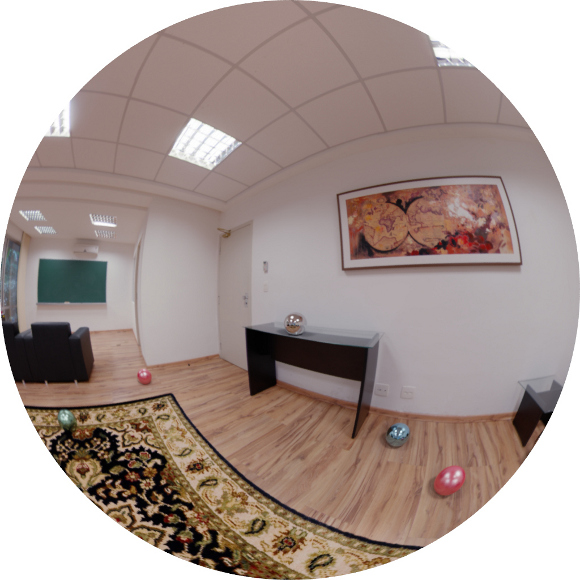
<body><![CDATA[<p><font face="Verdana" size="2"><a   id="x1-60003"></a>Environment mesh construction</font></p> <!--l. 67-->    <p ><font face="Verdana" size="2">In our study we decided to use hand-modeling for the environment reconstruction. We developed a plugin for Blender, which calibrates and help this reconstruction process, guided by the captured panorama.. This is also a very flexible step, where there is plenty of freedom in which technology to adopt. For instance, the environment mesh can be obtained directly via 3d scanners. More affordable semi-automatic solutions, potentially more interesting for the independent artist, can also be reached with everyday tools like Kinect, as presented in the <span  class="ptmri7t-">KinectFusion </span>work <span class="cite">&#x00A0;[<a  id="bXkinectfusion"> </a><a  href="#Xkinectfusion">11</a>]</span>, or with a single moving camera as described in <span class="cite">&#x00A0;[<a  id="bXlivedense"> </a><a  href="#Xlivedense">12</a>]</span>. <!--l. 70--></font>    <p >   <font face="Verdana" size="2">We will now describe in more details the selected configuration for our experiments and show some results achieved with this approach. <!--l. 1--></font>    <p >        <p><font face="Verdana" size="2"><span class="titlemark">4    </span> <a   id="x1-70004"></a>Environment Capture</font></p> <!--l. 3-->    <p ><font face="Verdana" size="2">In order to obtain the light field of the environment, we need to resort to capture devices. Photography cameras can be calibrated to work as a light sensor with the right techniques and post processing software. For the ambit of this project we chose to work with semi-professional photographic equipment, considering this a good trade-off between consumer cameras and full professional devices. We used Debevec&#8217;s method to produce <span  class="ptmri7t-">HDR </span>maps from bracketed pictures <span class="cite">&#x00A0;[<a  id="bXDeb97"> </a><a  href="#XDeb97">5</a>]</span>. In total we took 9 pictures per camera orientation with the total of 7 different orientations to obtain the total of a <img  src="/img/revistas/cleiej/v16n3/3a082x.png" alt="360&#x2218;&#x00D7; 180&#x2218; "  class="math" > field of view from the camera point of view. The <span  class="ptmri7t-">HDR </span>stacks were then stitched together to produce an equirectangular panorama. For test our ideas we used a Nikon DX2S with a Nikon DX10.5mm fisheye lens, and a Manfrotto Pano head. For the <span  class="ptmri7t-">HDR </span>assembling we used <span  class="ptmri7t-">Luminance HDR </span>and for the stitching we used <span  class="ptmri7t-">Hugin</span>, both open source projects freely available in the Internet. <!--l. 6--></font>    <p >   <font face="Verdana" size="2">We based our panorama capturing on the study presented by Kuliyev <span class="cite">&#x00A0;[<a  id="bXpanorama"> </a><a  href="#Xpanorama">13</a>]</span> which presents different techniques, not discussed in the current project. Additionally, there is equipment in the market specially target for the movie making industry, not discussed in Kuliyev&#8217;s work. Expensive all-in-one solutions are used in Hollywood for capturing the environment light field                                                                                                                                                                                     and geometry (e.g., point clouding). For the purposes of this project we aimed at more affordable solutions within our reach and more accessible to a broader audience. <!--l. 8--></font>    <p >   <font face="Verdana" size="2">For future projects we consider the possibility of blending panorama video and panorama captured photography. Our approach with some considerations is as follows: <!--l. 11--></font>    <p >        <p><font face="Verdana" size="2"><span class="titlemark">4.1    </span> <a   id="x1-80004.1"></a>Photography Capture</font></p> <!--l. 13-->    ]]></body>
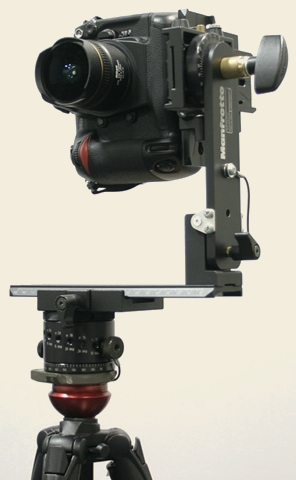
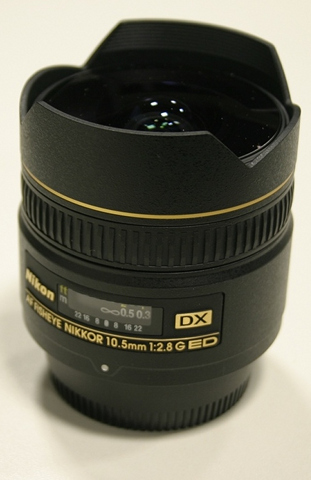
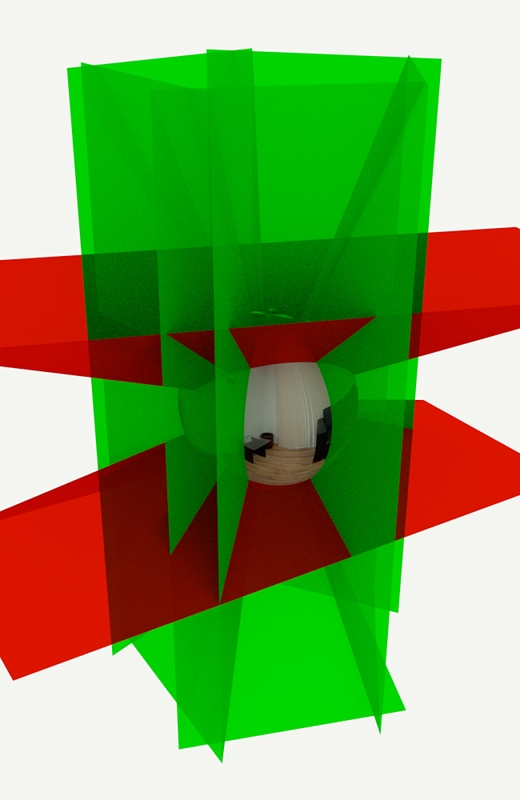
<body><![CDATA[<p ><font face="Verdana" size="2">A common solution for light field capturing - mirror ball pictures - was developed to be used as reflection map and lighting <span class="cite">&#x00A0;[<a  id="bXDeb97"> </a><a  href="#XDeb97">5</a>]</span>. However, when it comes to background plates, our earlier tests showed that a mirror ball picture lacks in quality, resolution and field of view. Therefore, in order to maximize the resolution of the captured light field we opted to take multiple photographies to assemble in the panorama. <!--l. 15--></font>    <p >   <font face="Verdana" size="2">To use multiple pictures to represent the environment is a common technique in photography and computational visioning. For rendered images, when a full ray tracer system is not available (specially aggravating for real-time applications) 6 pictures generated with a <img  src="/img/revistas/cleiej/v16n3/3a083x.png" alt="90&#x2218; "  class="math" > frustum camera oriented towards a cube are sufficient to recreate the environment with a good trade-off between render size and pixel distortion <span class="cite">&#x00A0;[<a  id="bXfelinto10"> </a><a  href="#Xfelinto10">8</a>]</span>. <!--l. 17--></font>    <p >   <font face="Verdana" size="2">We chose a fisheye lens (Nikon 10.5 mm) to increase the field of view per picture and minimize the number of required shots. We used 7 pictures in total, including the north and south pole (see figure&#x00A0;<a  href="#x1-8004r1">1<!--tex4ht:ref: fig:equipment --></a>).   <!--l. 20--></font>    <p >   <hr class="figure">    <div class="figure"  >                                                                                                                                                                                  <font face="Verdana" size="2">                                                                                                                                                                                  <a   id="x1-8004r1"></a>                                                                                                                                                                                    </font>                                                                                                                                                                                    </p>     <p align="center"> <font face="Verdana" size="2"> <a   id="x1-8001r1"> <img src="/img/revistas/cleiej/v16n3/3a08f2.jpg"> </a>     <br> (a) Manfrotto Pano Head, Nikon DX2S camera and Nikon 10.5mm fisheye lens.</font></p>      <p align="center"> <font face="Verdana" size="2"> <a   id="x1-8002r2"> <img src="/img/revistas/cleiej/v16n3/3a08f3.jpg"> </a>     <br> (b) Nikon 10.5mm fisheye lens. </font> </p>       <p align="center"> <font face="Verdana" size="2"> <a   id="x1-8003r3"> <img src="/img/revistas/cleiej/v16n3/3a08f4.jpg"> </a>     ]]></body>
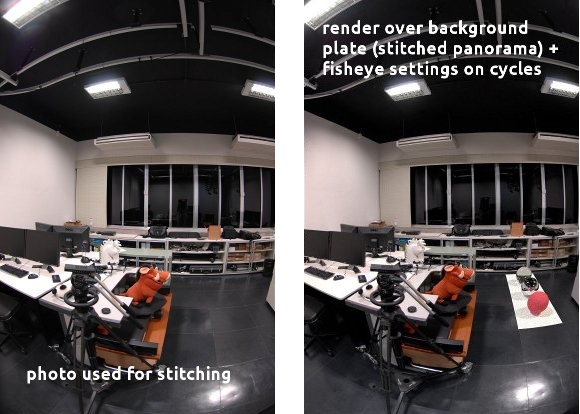
<body><![CDATA[<br> (c) For Nikon 10.5mm: 5 photos around z-axis, 1 zenith photo and 1 nadir photo </font> </p>        <div class="caption"> <font face="Verdana" size="2"> <span class="id">Figure&#x00A0;1:  </span><span   class="content">(a),  (b):  Equipment  used  to  capture  the  full  environment.  (c):  Space  partition  used  for  assembly  the panorama.</span></font></div><!--tex4ht:label?: x1-8004r1 -->                                                                                           <!--l. 36-->    <p >   </div><hr class="endfigure">         <p><font face="Verdana" size="2"><span class="titlemark">4.2    </span> <a   id="x1-90004.2"></a>Nadir - South Pole</font></p> <!--l. 40-->    <p ><font face="Verdana" size="2">The south pole is known for its penguins and panorama stitching problems. Many artists consider the capture of the <span  class="ptmri7t-">nadir</span> optional, given that the tripod occludes part of the environment in that direction. In fact this can be solved by the strategical placement of synthetic elements during the environment modeling reconstruction (see <a  href="#x1-220006.3">6.3<!--tex4ht:ref: carpet --></a>). To produce a complete capture of the environment we took the nadir picture without the tripod - hand-helding the camera. This can introduce anomalies and imprecisions in the panorama stitching. <!--l. 43--></font>    <p >   <font face="Verdana" size="2">To minimize this problem, we masked out the <span  class="ptmri7t-">nadir </span>photo to contain only the missing pixels from the other shots. To give a better estimative on what to mask we stitched a panorama without the south pole, and created a virtual fisheye lens to emulate the DX2S + 10.5mm lens. The fisheye lens distortion can be calculated with the equisolid fisheye equation (<a  href="#x1-9001r1">1<!--tex4ht:ref: equisolid --></a>): </font>    <table  class="equation"><tr><td><font face="Verdana" size="2"><a   id="x1-9001r1"></a>        </font>    <center class="math-display" > <font face="Verdana" size="2"> <img  src="/img/revistas/cleiej/v16n3/3a084x.png" alt="F OV      = 4&#x22C5;arcsin &#x22C5;(--framesize--)     equisolid           focallength&#x22C5;4 " class="math-display" ></font></center></td><td class="equation-label">        <font face="Verdana" size="2">(1)</font></td></tr></table> <!--l. 46-->    <p > <font face="Verdana" size="2"> <!--l. 48--></font>    <p >   <font face="Verdana" size="2">In the figure <a  href="#x1-9002r2">2<!--tex4ht:ref: fig:sidebysidecomp --></a> you can see the comparison between a fisheye image taken from the camera and a fisheye render captured from the spherical panorama with the virtual lens described above. This implementation was done in <span  class="ptmri7t-">Cycles</span>, a full ray tracer renderer of <span  class="ptmri7t-">Blender</span>. <!--l. 51--></font>    <p >   <hr class="figure">    <div class="figure"  >   <!--l. 53-->    ]]></body>
<body><![CDATA[<p ><font face="Verdana" size="2"><a   id="x1-9002r2"><img  src="/img/revistas/cleiej/v16n3/3a08f5.jpg" alt="PIC"   ></a> <br /> </font>     <div class="caption"  ><font face="Verdana" size="2"><span class="id">Figure&#x00A0;2: </span><span   class="content">Left: the real photograph of the scene, Right: image rendered with cycles using the spherical panorama with virtual lens.</span></font></div><!--tex4ht:label?: x1-9002r2 -->                                                                                                                                                                                     <!--l. 56-->    <p >   </div><hr class="endfigure">        <p><font face="Verdana" size="2"><span class="titlemark">5    </span> <a   id="x1-100005"></a>Panorama Calibration</font></p> <!--l. 3-->    <p ><font face="Verdana" size="2">An equirectangular panorama is a discretization of a sphere in the planar space of the image. As such, there is an implicit but often misleading orientation of the representative space. The top and bottom part of the images represent the poles of the sphere. The discretized sphere, however is not necessarily aligned with the real world directions. In other words, the north pole of the sphere/image may not be pointing to the world&#8217;s zenith. <!--l. 5--></font>    <p >   <font face="Verdana" size="2">A second issue is the scale of the parametric space. The space represented in the equirectangular panorama is normalized around the camera point of view. In order to reconstruct the three-dimensional space, one needs to anchor one point in the represented space where the distance is known. For pictures not generated under controlled conditions, it can be hard to estimate the correct scale. This is not a problem as far as reconstruction of the environment goes. Nonetheless a high discrepancy in the scale of the scene should be considered for physic simulations, real world based lighting and artificial elements introduced with their real world scale in the scene. <!--l. 7--></font>    <p >   <font face="Verdana" size="2">The decision on introducing a calibration step was also to add more freedom to the capturing and obtaining of the panorama maps. The system can handle images with wavy horizons just as good as with pole oriented/aligned images. <!--l. 9--></font>    <p >        <p><font face="Verdana" size="2"><a   id="x1-110005"></a>Extra advantages of a calibration system:</font></p> <!--l. 10-->    <p >      <ol  class="enumerate1" >      <li    class="enumerate" id="x1-11002x1"><font face="Verdana" size="2">Allow to move important sampling regions off the poles.      </font>      </li>      <li    class="enumerate" id="x1-11004x2"><font face="Verdana" size="2">Less concern on tripod alignment for picture capturing.      </font>      </li>      <li    class="enumerate" id="x1-11006x3"><font face="Verdana" size="2">It works with panoramas obtained from the Internet.      </font>      </li>      <li    class="enumerate" id="x1-11008x4"><font face="Verdana" size="2">Optimal aligned axis for the world reconstruction.</font></li>    ]]></body>
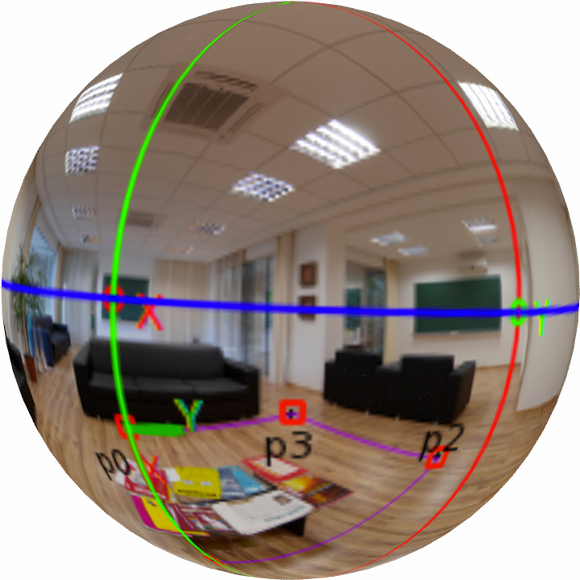
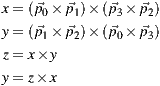
<body><![CDATA[</ol> <!--l. 17-->    <p >        <p><font face="Verdana" size="2"><span class="titlemark">5.1    </span> <a   id="x1-120005.1"></a>Horizon Alignment</font></p> <!--l. 19-->    <p ><font face="Verdana" size="2">In order to determine the horizontal alignment of a panorama we chose to locate the horizon through user input on known elements. We start off by opening the panorama in its image space (mapped in a ratio of 2:1) and have the user to select 4 points <img  src="/img/revistas/cleiej/v16n3/3a085x.png" alt="p0  "  class="math" >, <img  src="/img/revistas/cleiej/v16n3/3a086x.png" alt="p1  "  class="math" >, <img  src="/img/revistas/cleiej/v16n3/3a087x.png" alt="p2  "  class="math" > and <img  src="/img/revistas/cleiej/v16n3/3a088x.png" alt="p3  "  class="math" > that represent the corners of a rectangular shape in the world space that is placed on the floor (see figure <a  href="#x1-12001r3">3<!--tex4ht:ref: fig:calibration --></a>). <!--l. 21--></font>    <p >   <font face="Verdana" size="2">The selected points define vectors whose cross products determine the <span  class="ptmb7t-">x </span>and <span  class="ptmb7t-">y </span>axis of the horizontal plane. The cross product of <span  class="ptmb7t-">x </span>and <span  class="ptmb7t-">y </span>determines the <span  class="ptmb7t-">z </span>axis (connecting the south and the north poles). That should be enough to determine the global orientation of the image, but the manual input introduces human error to the calculation of the <span  class="ptmb7t-">x </span>and <span  class="ptmb7t-">y </span>axis. Instead of using the inputed data directly, we recalculate the <span  class="ptmb7t-">y </span>axis as the cross product of the <span  class="ptmb7t-">z </span>and the <span  class="ptmb7t-">x </span>axis in order to obtain an orthonormal basis. </font>        <div class="align"><font face="Verdana" size="2"><img  src="/img/revistas/cleiej/v16n3/3a089x.png" alt="pict" ></font></div> <!--l. 29-->    <p >   <font face="Verdana" size="2">To assure the result is satisfactory we re-project the horizon line and the axis in the image to provide visual feedback for user fine tuning of the calibration rectangle.                                                                                                                                                                                     <!--l. 31--></font>    <p >   <font face="Verdana" size="2">The rectangle chosen for the calibration defines the world axis and the floor plane alignment. This helps the stages of reconstruction of the existent world and the 3d modeling of new elements. <!--l. 34--></font>    <p >   <hr class="figure">    <div class="figure"  > <!--l. 36-->    ]]></body>
<body><![CDATA[<p ><font face="Verdana" size="2"><a   id="x1-12001r3"><img  src="/img/revistas/cleiej/v16n3/3a08f6.png" ></a> &#x00A0;&#x00A0;&#x00A0;&#x00A0;<img  src="/img/revistas/cleiej/v16n3/3a08f7.jpg"> <br /> </font>     <div class="caption"  ><font face="Verdana" size="2"><span class="id">Figure&#x00A0;3:  </span><span   class="content"><span  class="ptmb7t-">Up:  </span>Panorama  alignment  system.  The  four  points  on  the  floor  determine  the  orientation  axis for  the  environment.  The  blue,  red  and  green  lines  illustrate  the  <img  src="/img/revistas/cleiej/v16n3/3a0810x.png" alt="xy "  class="math" >  (horizon),  <img  src="/img/revistas/cleiej/v16n3/3a0811x.png" alt="xz "  class="math" >  and  <img  src="/img/revistas/cleiej/v16n3/3a0812x.png" alt="yz "  class="math" >  slice  planes respectively. <span  class="ptmb7t-">Down: </span>Spherical representation of the panorama with the axis.</span></font></div><!--tex4ht:label?: x1-12001r3 -->                                                                                                                                                                                     <!--l. 41-->    <p >   </div><hr class="endfigure">        <p><font face="Verdana" size="2"><span class="titlemark">5.2    </span> <a   id="x1-130005.2"></a>World Scaling</font></p> <!--l. 45-->    <p ><font face="Verdana" size="2">Once the orientation of the map is calculated we can project the selected rectangle onto the 3d world floor. We need, however, to gather more data - as the orientation alone is not sufficient. In fact any arbitrary positive non-zero value for the camera height will produce a different (scaled) reconstruction of the original geometry in the 3d world. For example, if the supposed original camera position is estimated higher than the position the tripod had when the pictures were taken, the reconstructed rectangle will be bigger than its original counterpart. <!--l. 47--></font>    <p >   <font face="Verdana" size="2">We have a dual system with the rectangle dimensions and the camera height. Thus we leave to the user to decide which one is the most accurate data available - the camera height or the rectangle dimensions. The rectangle dimensions are not used in the further reconstruction operations though. Instead we always calculate the camera height for the given input parameter (width or height) and use it to calculate the other rectangle side as well (height or width, respectively). <!--l. 49--></font>    <p >        <p><font face="Verdana" size="2"><span class="titlemark">5.3    </span> <a   id="x1-140005.3"></a>Further Considerations</font></p> <!--l. 51-->    <p ><font face="Verdana" size="2">There are other possible calibration systems that were considered for future implementations. In cases where no rectangle is easily recognized, the orientation plane can be defined by independent converging axis. In architecture environments it is common to have easy to recognize features (window edges, ceiling-wall bound) to use as guides for the camera calibration. <!--l. 53--></font>    <p >   <font face="Verdana" size="2">The adopted solution is a plane-centric workflow. The calibration rectangle does not need to be on the ground. It can just as well be part of a wall or the ceiling. In our production set we had more elements to use as reference keys on the floor, thus the preference on the implementation. We intend for future projects to explore the flexibility of this system. Nonetheless this is also the reason why the environment is reconstructed from the ground up, as described in the <a  href="#x1-150006">6<!--tex4ht:ref: envmodel --></a> section. <!--l. 1--></font>    ]]></body>
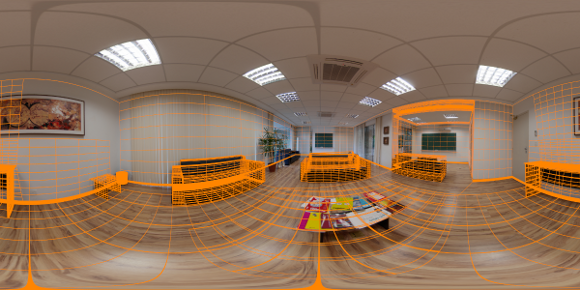
<body><![CDATA[<p >        <p><font face="Verdana" size="2"><span class="titlemark">6    </span> <a   id="x1-150006"></a>Environment Mesh Construction</font></p> <!--l. 3-->    <p ><font face="Verdana" size="2">There are different reasons for the environment to be modeled. With the full reconstruction of the captured space in the panorama we can move the camera freely around and have reflexive objects to bounce the light with the correct perspective. Nevertheless, the equirectangular image is not a direct 3d map of the environment. The panorama is one of different possible parameterizations of the sphere. It lacks information to re-project the space beyond the two dimensions of the sphere surface. If we can estimate the depth of the image pixels we can reconstruct the original represented space. Therefore we can render more complex light interactions such as glossy reflections and accurate shadow orientation. <!--l. 5--></font>    <p >   <font face="Verdana" size="2">The environment meshes serve multiple purposes in our work: (a) In the rendering stage, the environment is used to compute the light position in world space for the reflection rays (see section <a  href="#x1-290007.4">7.4<!--tex4ht:ref: reflections --></a>); (b) The scene depth needs to be calculated and stored with the <span  class="ptmri7t-">HDR </span>needed by the render integrator to resolve visibility tests (see sections <a  href="#x1-260007.1">7.1<!--tex4ht:ref: lightdepth --></a> and <a  href="#x1-280007.3">7.3<!--tex4ht:ref: visibility --></a>); (c) Part of the modeled environment serves as support surfaces for the shadow and reflection rendering of the synthetic elements in the assembled panorama (see section <a  href="#x1-270007.2">7.2<!--tex4ht:ref: surfaces --></a>); (d) Modeled elements can be transformed while keeping their reference to how they map to the original environment to produce effects such as environment deformation and conformation to the synthetic elements (see section <a  href="#x1-230006.4">6.4<!--tex4ht:ref: envcoords --></a>); (e) Finally, in the artistic production it is helpful to have structural elements for the physic animation/simulations and for visual occlusion of the synthetic elements. <!--l. 7--></font>    <p >   <font face="Verdana" size="2">There are different devices and techniques to obtain the environment mesh. The most advanced method involves depth cameras to generated point clouds to be remapped into the capture photography. This method brings a lot of precision and speed improvements to the pipeline. Those are essential features for feature-length movies that require multiple environments to be captured for a production. Another method is to capture different panoramas from similar positions, and to use a parallax-based reconstruction algorithm. The downside of this method is that it requires at least two panoramas per scene and it fails if the main captured area has no distinguished features that can be tracked. <!--l. 10--></font>    <p >   <font face="Verdana" size="2">The present framework will focus on a more accessible method, which requires no special capture device or algorithm. This approach is at the same time economic and didactic. Regardless of the method adopted, it is important to understand the fundamentals of mesh reconstruction in a perspective captured environment. The scene here is reconstructed in parts. Due to the implications of the implemented calibration system, the floor is the most known region. Therefore we start modeling the object projections on the floor plane. Figure <a  href="#x1-15001r4">4<!--tex4ht:ref: fig:envmesh --></a> shows our Blender plug-in for calibrate the panorama and modeling the environment mesh.  <!--l. 12--></font>    <p >   <hr class="figure">    <div class="figure"  >  <!--l. 14-->    <p ><font face="Verdana" size="2"><a   id="x1-15001r4"> <img  src="/img/revistas/cleiej/v16n3/3a08f8.jpg"></a>     <br> <img  src="/img/revistas/cleiej/v16n3/3a08f9.png"> <br /> </font>     ]]></body>
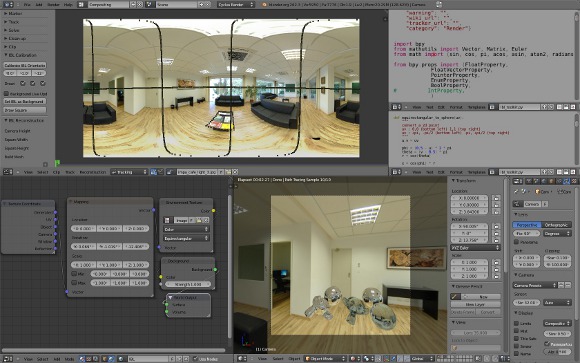
<body><![CDATA[<div class="caption"  ><font face="Verdana" size="2"><span class="id">Figure&#x00A0;4: </span><span   class="content"><span  class="ptmb7t-">Left: </span>IBL toolkit for Blender. This toolkit allows to calibrate the panorama and construct the environment mesh. <span  class="ptmb7t-">Right: </span>The environment mesh modeled over the input panorama.</span></font></div><!--tex4ht:label?: x1-15001r4 -->                                                                                                                                                                                     <!--l. 20-->    <p >   </div><hr class="endfigure">        <p><font face="Verdana" size="2"><span class="titlemark">6.1    </span> <a   id="x1-160006.1"></a>Floor Reconstruction</font></p> <!--l. 25-->    <p ><font face="Verdana" size="2">A system with the floor region defined in the image space and extra structuring points helps to build basic geometric elements. Two points can be used to define the corners of a square. Three points can delimitate the perimeter of a circle or define a side and the height of a rectangle. <!--l. 28--></font>    <p >        <p><font face="Verdana" size="2"><span class="titlemark">6.1.1    </span> <a   id="x1-170006.1.1"></a>Square</font></p> <!--l. 30-->    <p ><font face="Verdana" size="2">The making of a square by its corners is a problem of vectorial math in the reconstructed 3d space. It is convenient for the 3d artist to have a canonical square defined in the local space, while determining the square size, location and rotation in the world space. Thus we use the two selected points of the image to determine the length of the square diagonal which will be used to assign the square world scale. </font>        <div class="align"><font face="Verdana" size="2"><img  src="/img/revistas/cleiej/v16n3/3a0813x.png" alt="pict" ></font></div> <!--l. 38-->    <p >        <p><font face="Verdana" size="2"><span class="titlemark">6.1.2    </span> <a   id="x1-180006.1.2"></a>Circle</font></p> <!--l. 40-->    ]]></body>
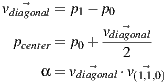
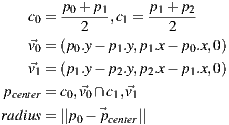
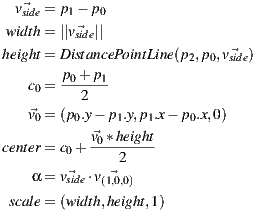
<body><![CDATA[<p ><font face="Verdana" size="2">The canonical formula of the circle is defined by its center and its radius. Only in few cases you will have the center visible in the panorama though. Instead we implemented a circle defined by three points of the circumference. Even if the circle is partially occluded this method can be successfully applied. </font>        <div class="align"><font face="Verdana" size="2"><img  src="/img/revistas/cleiej/v16n3/3a0814x.png" alt="pict" ></font></div> <!--l. 50-->    <p >        <p><font face="Verdana" size="2"><span class="titlemark">6.1.3    </span> <a   id="x1-190006.1.3"></a>Rectangle</font></p> <!--l. 52-->    <p ><font face="Verdana" size="2">Objects that have a parallelogram geometry (for example table feet, chests, boxes) can be rebuild with a rectangular base projected on the floor. Unless their material is transparent, or only structural (for example, wires), they will have at least one of their corners occluded by its own three-dimensional body. In this case three points will have to be used to reconstruct the rectangular base. <!--l. 54--></font>    <p >   <font face="Verdana" size="2">In the pure mathematical sense, three points can define a rectangle in different ways. For instance, if they define three corners the fourth vertex can be inferred from the angles defined between the existent vertices. However, it is hard to rely on user input to precisely reconstruct the right angle intrinsic of the rectangular shape. Thus we have the user defining one of the sides of the rectangle through the two first points and setting the height with the third point. This way, even if the point does not produce a perfect right angle when projected on the floor with the defined rectangle side we can use it to calculate the distance between the opposite sides of the rectangle and ensure a perfect reconstruction of the shape. </font>                                                                                                                                                                                            <div class="align"><font face="Verdana" size="2"><img  src="/img/revistas/cleiej/v16n3/3a0815x.png" alt="pict" ></font></div> <!--l. 67-->    <p >   <font face="Verdana" size="2">The final shape is built in world space with the scale, orientation and position defined by the formula above. In the local space we preserve a square geometry of unitary dimensions to help the artist to adjust the real size of the geometry by directly setting its scale. <!--l. 69--></font>    <p >        <p><font face="Verdana" size="2"><span class="titlemark">6.1.4    </span> <a   id="x1-200006.1.4"></a>Polygon</font></p> <!--l. 71-->    ]]></body>
<body><![CDATA[<p ><font face="Verdana" size="2">Any other simplex can be traced to outline the floor boundary or the projection of other scene elements on the floor. The points selected in the panorama image are projected to the 3d world using the camera height the same way we do for the other geometry shapes. <!--l. 74--></font>    <p >        <p><font face="Verdana" size="2"><span class="titlemark">6.2    </span> <a   id="x1-210006.2"></a>Background Mapping</font></p> <!--l. 76-->    <p ><font face="Verdana" size="2">To rebuild elements that are not contained on the ground we needed a way to edit the meshes while looking at their projection in the panorama image. Traditionally, this is done using individual pictures taken of fractions of the set and used as background plates <span class="cite">&#x00A0;[<a  id="bXzang11"> </a><a  href="#Xzang11">1</a>]</span>. The same mapping used during render for the background plate needs to be replicated in the 3d viewport of the modeling software. In the end the environment image is mapped spherically as a background element, allowing it to be explored with a virtual camera with regular frustum (fov <img  src="/img/revistas/cleiej/v16n3/3a0816x.png" alt="     &#x2218; &#x003C; 180 "  class="math" >) common in any 3d software. <!--l. 78--></font>    <p >   <font face="Verdana" size="2">The implementation prioritized a non-intrusive approach in the software to ensure it can be replicated regardless of the suite chosen by the studio/artist. After every 3d view rendering loop we capture the color (with the alpha) buffer and run a GLSL screen shader with the inverse of the projection modelview matrix, the color buffers and the panorama image as uniforms. There are two reasons to pass the matrix as uniform: (a) we used the classic GLSL screen shader implementation <span class="cite">&#x00A0;[<a  id="bXorange"> </a><a  href="#Xorange">14</a>]</span> which re-set the projection and modelview matrices in order to draw a rectangle in the whole canvas so the shader program can run as a fragment shader on it. The matrices are then rescued before the view is setup, and the inverse matrix is calculated in CPU; (b) We need to account for the orientation of the world calculated when the panorama is calibrated (see section <a  href="#x1-120005.1">5.1<!--tex4ht:ref: horizonalign --></a>). </font>        <div class="align"><font face="Verdana" size="2"><img  src="/img/revistas/cleiej/v16n3/3a0817x.png" alt="pict" ></font></div> <!--l. 82-->    <p >   <font face="Verdana" size="2">The shader performs a transformation from the canvas space to the panorama image space and uses the alpha from the buffer to determine where to draw the panorama. If the alpha channel is not present in the viewport, the depth buffer can be used. The background texture coordinate is calculated with a routine <img  src="/img/revistas/cleiej/v16n3/3a0818x.png" alt="equirectangular(normalize(world))  "  class="math" > where <span  class="ptmri7t-">world </span>is obtained with a GLSL implementation of <span  class="ptmb7t-">glUnproject </span>using the <span  class="ptmri7t-">Model View Projection </span>matrix uniform to convert the view space coordinates into the world space.    <!--l. 84--> </font>     <div class="lstlisting" id="listing-1"><font face="Verdana" size="2"><span class="label"><a       id="x1-21001r1"></a></span><span      class="ptmr7t-x-x-70">#version&#x00A0;120&#x00A0;</span><br /><span class="label"><a      ]]></body>

<body><![CDATA[ id="x1-21002r2"></a></span><span      class="ptmb7t-x-x-70">uniform</span><span      class="ptmr7t-x-x-70">&#x00A0;</span><span      class="ptmb7t-x-x-70">sampler2D</span><span      class="ptmr7t-x-x-70">&#x00A0;</span><span      class="pcrr7tn-x-x-70">color_buffer</span><span      class="ptmr7t-x-x-70">;&#x00A0;</span><br /><span class="label"><a       id="x1-21003r3"></a></span><span      class="ptmb7t-x-x-70">uniform</span><span      class="ptmr7t-x-x-70">&#x00A0;</span><span      ]]></body>
<body><![CDATA[class="ptmb7t-x-x-70">sampler2D</span><span      class="ptmr7t-x-x-70">&#x00A0;</span><span      class="pcrr7tn-x-x-70">texture_buffer</span><span      class="ptmr7t-x-x-70">;&#x00A0;</span><br /><span class="label"><a       id="x1-21004r4"></a></span><span      class="ptmr7t-x-x-70">&#x00A0;</span><br /><span class="label"><a       id="x1-21005r5"></a></span><span      class="ptmb7t-x-x-70">uniform</span><span      class="ptmr7t-x-x-70">&#x00A0;</span><span      class="ptmb7t-x-x-70">mat4</span><span      ]]></body>
<body><![CDATA[class="ptmr7t-x-x-70">&#x00A0;</span><span      class="pcrr7tn-x-x-70">projectionmodelviewinverse</span><span      class="ptmr7t-x-x-70">;&#x00A0;</span><br /><span class="label"><a       id="x1-21006r6"></a></span><span      class="ptmr7t-x-x-70">&#x00A0;</span><br /><span class="label"><a       id="x1-21007r7"></a></span><span      class="ptmr7t-x-x-70">#define&#x00A0;PI&#x00A0;&#x00A0;3.14159265&#x00A0;</span><br /><span class="label"><a       id="x1-21008r8"></a></span><span      class="ptmr7t-x-x-70">&#x00A0;</span><br /><span class="label"><a       id="x1-21009r9"></a></span><span      ]]></body>
<body><![CDATA[class="ptmb7t-x-x-70">vec3</span><span      class="ptmr7t-x-x-70">&#x00A0;</span><span      class="pcrr7tn-x-x-70">glUnprojectGL</span><span      class="ptmr7t-x-x-70">(</span><span      class="ptmb7t-x-x-70">vec2</span><span      class="ptmr7t-x-x-70">&#x00A0;</span><span      class="pcrr7tn-x-x-70">coords</span><span      class="ptmr7t-x-x-70">)&#x00A0;</span><br /><span class="label"><a       id="x1-21010r10"></a></span><span      class="zpzccmry-x-x-70">{</span><span      ]]></body>
<body><![CDATA[class="ptmr7t-x-x-70">&#x00A0;</span><br /><span class="label"><a       id="x1-21011r11"></a></span><span      class="ptmr7t-x-x-70">&#x00A0;&#x00A0;</span><span      class="ptmb7t-x-x-70">float</span><span      class="ptmr7t-x-x-70">&#x00A0;</span><span      class="pcrr7tn-x-x-70">u</span><span      class="ptmr7t-x-x-70">&#x00A0;=&#x00A0;</span><span      class="pcrr7tn-x-x-70">coords</span><span      class="ptmr7t-x-x-70">.</span><span      class="pcrr7tn-x-x-70">s</span><span      ]]></body>
<body><![CDATA[class="ptmr7t-x-x-70">&#x00A0;</span><span      class="ptmr8c-x-x-70">*</span><span      class="ptmr7t-x-x-70">&#x00A0;2.0&#x00A0;</span><span      class="zpzccmry-x-x-70">-</span><span      class="ptmr7t-x-x-70">&#x00A0;1.0;&#x00A0;</span><br /><span class="label"><a       id="x1-21012r12"></a></span><span      class="ptmr7t-x-x-70">&#x00A0;&#x00A0;</span><span      class="ptmb7t-x-x-70">float</span><span      class="ptmr7t-x-x-70">&#x00A0;</span><span      class="pcrr7tn-x-x-70">v</span><span      ]]></body>
<body><![CDATA[class="ptmr7t-x-x-70">&#x00A0;=&#x00A0;</span><span      class="pcrr7tn-x-x-70">coords</span><span      class="ptmr7t-x-x-70">.</span><span      class="pcrr7tn-x-x-70">t</span><span      class="ptmr7t-x-x-70">&#x00A0;</span><span      class="ptmr8c-x-x-70">*</span><span      class="ptmr7t-x-x-70">&#x00A0;2.0&#x00A0;</span><span      class="zpzccmry-x-x-70">-</span><span      class="ptmr7t-x-x-70">&#x00A0;1.0;&#x00A0;</span><br /><span class="label"><a       id="x1-21013r13"></a></span><span      ]]></body>
<body><![CDATA[class="ptmr7t-x-x-70">&#x00A0;</span><br /><span class="label"><a       id="x1-21014r14"></a></span><span      class="ptmr7t-x-x-70">&#x00A0;&#x00A0;</span><span      class="ptmb7t-x-x-70">vec4</span><span      class="ptmr7t-x-x-70">&#x00A0;</span><span      class="pcrr7tn-x-x-70">view</span><span      class="ptmr7t-x-x-70">&#x00A0;=&#x00A0;</span><span      class="ptmb7t-x-x-70">vec4</span><span      class="ptmr7t-x-x-70">(</span><span      class="pcrr7tn-x-x-70">u</span><span      ]]></body>
<body><![CDATA[class="ptmr7t-x-x-70">,&#x00A0;</span><span      class="pcrr7tn-x-x-70">v</span><span      class="ptmr7t-x-x-70">,&#x00A0;1.0,&#x00A0;1.0);&#x00A0;</span><br /><span class="label"><a       id="x1-21015r15"></a></span><span      class="ptmr7t-x-x-70">&#x00A0;&#x00A0;</span><span      class="ptmb7t-x-x-70">vec4</span><span      class="ptmr7t-x-x-70">&#x00A0;</span><span      class="pcrr7tn-x-x-70">world</span><span      class="ptmr7t-x-x-70">&#x00A0;=&#x00A0;</span><span      class="pcrr7tn-x-x-70">projectionmodelviewinverse</span><span      ]]></body>
<body><![CDATA[class="ptmr7t-x-x-70">&#x00A0;</span><span      class="ptmr8c-x-x-70">*</span><span      class="ptmr7t-x-x-70">&#x00A0;</span><span      class="ptmb7t-x-x-70">vec4</span><span      class="ptmr7t-x-x-70">(</span><span      class="pcrr7tn-x-x-70">view</span><span      class="ptmr7t-x-x-70">.</span><span      class="pcrr7tn-x-x-70">x</span><span      class="ptmr7t-x-x-70">,&#x00A0;</span><span      class="pcrr7tn-x-x-70">view</span><span      ]]></body>
<body><![CDATA[class="ptmr7t-x-x-70">.</span><span      class="pcrr7tn-x-x-70">y</span><span      class="ptmr7t-x-x-70">,&#x00A0;</span><span      class="zpzccmry-x-x-70">-</span><span      class="pcrr7tn-x-x-70">view</span><span      class="ptmr7t-x-x-70">.</span><span      class="pcrr7tn-x-x-70">z</span><span      class="ptmr7t-x-x-70">,&#x00A0;1.0);&#x00A0;</span><br /><span class="label"><a       id="x1-21016r16"></a></span><span      class="ptmr7t-x-x-70">&#x00A0;</span><br /><span class="label"><a      ]]></body>
<body><![CDATA[ id="x1-21017r17"></a></span><span      class="ptmr7t-x-x-70">&#x00A0;&#x00A0;</span><span      class="ptmb7t-x-x-70">return</span><span      class="ptmr7t-x-x-70">&#x00A0;</span><span      class="ptmb7t-x-x-70">vec3</span><span      class="ptmr7t-x-x-70">(</span><span      class="pcrr7tn-x-x-70">world</span><span      class="ptmr7t-x-x-70">[0]&#x00A0;</span><span      class="ptmr8c-x-x-70">*</span><span      class="ptmr7t-x-x-70">&#x00A0;</span><span      ]]></body>
<body><![CDATA[class="pcrr7tn-x-x-70">world</span><span      class="ptmr7t-x-x-70">[3],&#x00A0;</span><span      class="pcrr7tn-x-x-70">world</span><span      class="ptmr7t-x-x-70">[1]&#x00A0;</span><span      class="ptmr8c-x-x-70">*</span><span      class="ptmr7t-x-x-70">&#x00A0;&#x00A0;</span><span      class="pcrr7tn-x-x-70">world</span><span      class="ptmr7t-x-x-70">[3],&#x00A0;</span><span      class="pcrr7tn-x-x-70">world</span><span      class="ptmr7t-x-x-70">[2]&#x00A0;</span><span      ]]></body>
<body><![CDATA[class="ptmr8c-x-x-70">*</span><span      class="ptmr7t-x-x-70">&#x00A0;</span><span      class="pcrr7tn-x-x-70">world</span><span      class="ptmr7t-x-x-70">[3]);&#x00A0;</span><br /><span class="label"><a       id="x1-21018r18"></a></span><span      class="zpzccmry-x-x-70">}</span><span      class="ptmr7t-x-x-70">&#x00A0;</span><br /><span class="label"><a       id="x1-21019r19"></a></span><span      class="ptmr7t-x-x-70">&#x00A0;</span><br /><span class="label"><a       id="x1-21020r20"></a></span><span      ]]></body>
<body><![CDATA[class="ptmb7t-x-x-70">vec2</span><span      class="ptmr7t-x-x-70">&#x00A0;</span><span      class="pcrr7tn-x-x-70">equirectangular</span><span      class="ptmr7t-x-x-70">(</span><span      class="ptmb7t-x-x-70">vec3</span><span      class="ptmr7t-x-x-70">&#x00A0;</span><span      class="pcrr7tn-x-x-70">vert</span><span      class="ptmr7t-x-x-70">)&#x00A0;</span><br /><span class="label"><a       id="x1-21021r21"></a></span><span      class="zpzccmry-x-x-70">{</span><span      ]]></body>
<body><![CDATA[class="ptmr7t-x-x-70">&#x00A0;</span><br /><span class="label"><a       id="x1-21022r22"></a></span><span      class="ptmr7t-x-x-70">&#x00A0;&#x00A0;</span><span      class="ptmb7t-x-x-70">float</span><span      class="ptmr7t-x-x-70">&#x00A0;</span><span      class="pcrr7tn-x-x-70">theta</span><span      class="ptmr7t-x-x-70">&#x00A0;=&#x00A0;</span><span      class="ptmb7t-x-x-70">asin</span><span      class="ptmr7t-x-x-70">(</span><span      class="pcrr7tn-x-x-70">vert</span><span      ]]></body>
<body><![CDATA[class="ptmr7t-x-x-70">.</span><span      class="pcrr7tn-x-x-70">z</span><span      class="ptmr7t-x-x-70">);&#x00A0;</span><br /><span class="label"><a       id="x1-21023r23"></a></span><span      class="ptmr7t-x-x-70">&#x00A0;&#x00A0;</span><span      class="ptmb7t-x-x-70">float</span><span      class="ptmr7t-x-x-70">&#x00A0;</span><span      class="pcrr7tn-x-x-70">phi</span><span      class="ptmr7t-x-x-70">&#x00A0;=&#x00A0;</span><span      class="ptmb7t-x-x-70">atan</span><span      ]]></body>
<body><![CDATA[class="ptmr7t-x-x-70">(</span><span      class="pcrr7tn-x-x-70">vert</span><span      class="ptmr7t-x-x-70">.</span><span      class="pcrr7tn-x-x-70">x</span><span      class="ptmr7t-x-x-70">,&#x00A0;</span><span      class="pcrr7tn-x-x-70">vert</span><span      class="ptmr7t-x-x-70">.</span><span      class="pcrr7tn-x-x-70">y</span><span      class="ptmr7t-x-x-70">);&#x00A0;</span><br /><span class="label"><a       id="x1-21024r24"></a></span><span      ]]></body>
<body><![CDATA[class="ptmr7t-x-x-70">&#x00A0;</span><br /><span class="label"><a       id="x1-21025r25"></a></span><span      class="ptmr7t-x-x-70">&#x00A0;&#x00A0;</span><span      class="ptmb7t-x-x-70">float</span><span      class="ptmr7t-x-x-70">&#x00A0;</span><span      class="pcrr7tn-x-x-70">u</span><span      class="ptmr7t-x-x-70">&#x00A0;=&#x00A0;0.5&#x00A0;</span><span      class="ptmr8c-x-x-70">*</span><span      class="ptmr7t-x-x-70">&#x00A0;(</span><span      class="pcrr7tn-x-x-70">phi</span><span      ]]></body>
<body><![CDATA[class="ptmr7t-x-x-70">&#x00A0;/&#x00A0;</span><span      class="pcrr7tn-x-x-70">PI</span><span      class="ptmr7t-x-x-70">)&#x00A0;+&#x00A0;0.25;&#x00A0;</span><br /><span class="label"><a       id="x1-21026r26"></a></span><span      class="ptmr7t-x-x-70">&#x00A0;&#x00A0;</span><span      class="ptmb7t-x-x-70">float</span><span      class="ptmr7t-x-x-70">&#x00A0;</span><span      class="pcrr7tn-x-x-70">v</span><span      class="ptmr7t-x-x-70">&#x00A0;=&#x00A0;0.5&#x00A0;+&#x00A0;</span><span      class="pcrr7tn-x-x-70">theta</span><span      ]]></body>
<body><![CDATA[class="ptmr7t-x-x-70">/</span><span      class="pcrr7tn-x-x-70">PI</span><span      class="ptmr7t-x-x-70">;&#x00A0;</span><br /><span class="label"><a       id="x1-21027r27"></a></span><span      class="ptmr7t-x-x-70">&#x00A0;</span><br /><span class="label"><a       id="x1-21028r28"></a></span><span      class="ptmr7t-x-x-70">&#x00A0;&#x00A0;</span><span      class="ptmb7t-x-x-70">return</span><span      class="ptmr7t-x-x-70">&#x00A0;</span><span      class="ptmb7t-x-x-70">vec2</span><span      ]]></body>
<body><![CDATA[class="ptmr7t-x-x-70">(</span><span      class="pcrr7tn-x-x-70">u</span><span      class="ptmr7t-x-x-70">,</span><span      class="pcrr7tn-x-x-70">v</span><span      class="ptmr7t-x-x-70">);&#x00A0;</span><br /><span class="label"><a       id="x1-21029r29"></a></span><span      class="zpzccmry-x-x-70">}</span><span      class="ptmr7t-x-x-70">&#x00A0;</span><br /><span class="label"><a       id="x1-21030r30"></a></span><span      class="ptmr7t-x-x-70">&#x00A0;</span><br /><span class="label"><a      ]]></body>
<body><![CDATA[ id="x1-21031r31"></a></span><span      class="ptmb7t-x-x-70">void</span><span      class="ptmr7t-x-x-70">&#x00A0;</span><span      class="pcrr7tn-x-x-70">main</span><span      class="ptmr7t-x-x-70">(</span><span      class="ptmb7t-x-x-70">void</span><span      class="ptmr7t-x-x-70">)&#x00A0;</span><br /><span class="label"><a       id="x1-21032r32"></a></span><span      class="zpzccmry-x-x-70">{</span><span      class="ptmr7t-x-x-70">&#x00A0;</span><br /><span class="label"><a      ]]></body>
<body><![CDATA[ id="x1-21033r33"></a></span><span      class="ptmr7t-x-x-70">&#x00A0;&#x00A0;</span><span      class="ptmb7t-x-x-70">vec2</span><span      class="ptmr7t-x-x-70">&#x00A0;</span><span      class="pcrr7tn-x-x-70">coords</span><span      class="ptmr7t-x-x-70">&#x00A0;=&#x00A0;</span><span      class="pcrr7tn-x-x-70">gl_TexCoord</span><span      class="ptmr7t-x-x-70">[0].</span><span      class="pcrr7tn-x-x-70">st</span><span      class="ptmr7t-x-x-70">;&#x00A0;</span><br /><span class="label"><a      ]]></body>
<body><![CDATA[ id="x1-21034r34"></a></span><span      class="ptmr7t-x-x-70">&#x00A0;&#x00A0;</span><span      class="ptmb7t-x-x-70">vec4</span><span      class="ptmr7t-x-x-70">&#x00A0;</span><span      class="pcrr7tn-x-x-70">foreground</span><span      class="ptmr7t-x-x-70">&#x00A0;=&#x00A0;</span><span      class="ptmb7t-x-x-70">texture2D</span><span      class="ptmr7t-x-x-70">(</span><span      class="pcrr7tn-x-x-70">color_buffer</span><span      class="ptmr7t-x-x-70">,&#x00A0;</span><span      ]]></body>
<body><![CDATA[class="pcrr7tn-x-x-70">coords</span><span      class="ptmr7t-x-x-70">);&#x00A0;</span><br /><span class="label"><a       id="x1-21035r35"></a></span><span      class="ptmr7t-x-x-70">&#x00A0;&#x00A0;</span><span      class="ptmb7t-x-x-70">vec3</span><span      class="ptmr7t-x-x-70">&#x00A0;</span><span      class="pcrr7tn-x-x-70">world</span><span      class="ptmr7t-x-x-70">&#x00A0;=&#x00A0;</span><span      class="pcrr7tn-x-x-70">glUnprojectGL</span><span      class="ptmr7t-x-x-70">(</span><span      ]]></body>
<body><![CDATA[class="pcrr7tn-x-x-70">coords</span><span      class="ptmr7t-x-x-70">);&#x00A0;</span><br /><span class="label"><a       id="x1-21036r36"></a></span><span      class="ptmr7t-x-x-70">&#x00A0;&#x00A0;</span><span      class="ptmb7t-x-x-70">vec4</span><span      class="ptmr7t-x-x-70">&#x00A0;</span><span      class="pcrr7tn-x-x-70">background</span><span      class="ptmr7t-x-x-70">&#x00A0;=&#x00A0;</span><span      class="ptmb7t-x-x-70">texture2D</span><span      class="ptmr7t-x-x-70">(</span><span      ]]></body>
<body><![CDATA[class="pcrr7tn-x-x-70">texture_buffer</span><span      class="ptmr7t-x-x-70">,&#x00A0;</span><span      class="pcrr7tn-x-x-70">equirectangular</span><span      class="ptmr7t-x-x-70">(</span><span      class="ptmb7t-x-x-70">normalize</span><span      class="ptmr7t-x-x-70">(</span><span      class="pcrr7tn-x-x-70">world</span><span      class="ptmr7t-x-x-70">)));&#x00A0;</span><br /><span class="label"><a       id="x1-21037r37"></a></span><span      class="ptmr7t-x-x-70">&#x00A0;</span><br /><span class="label"><a      ]]></body>
<body><![CDATA[ id="x1-21038r38"></a></span><span      class="ptmr7t-x-x-70">&#x00A0;&#x00A0;</span><span      class="ptmb7t-x-x-70">gl_FragColor</span><span      class="ptmr7t-x-x-70">&#x00A0;=&#x00A0;</span><span      class="ptmb7t-x-x-70">mix</span><span      class="ptmr7t-x-x-70">(</span><span      class="pcrr7tn-x-x-70">background</span><span      class="ptmr7t-x-x-70">,&#x00A0;</span><span      class="pcrr7tn-x-x-70">foreground</span><span      class="ptmr7t-x-x-70">,&#x00A0;</span><span      ]]></body>
<body><![CDATA[class="pcrr7tn-x-x-70">foreground</span><span      class="ptmr7t-x-x-70">.</span><span      class="pcrr7tn-x-x-70">a</span><span      class="ptmr7t-x-x-70">);&#x00A0;</span><br /><span class="label"><a       id="x1-21039r39"></a></span><span      class="zpzccmry-x-x-70">}</span> </font>        </div>     <!--l. 126-->    <p >   <font face="Verdana" size="2">The background is consistent even for different frustum lens and camera orientations. This technique frees the artist to create entirely in the 3d space without the troubles of the image/panorama space. For a perfect mapping it is important to use an image with no mipmaps or to use the GLSL routine to specify which mipmap level to access (<img  src="/img/revistas/cleiej/v16n3/3a08334x.png" alt="textureLod "  class="math" >). <!--l. 128--></font>    <p >        ]]></body>
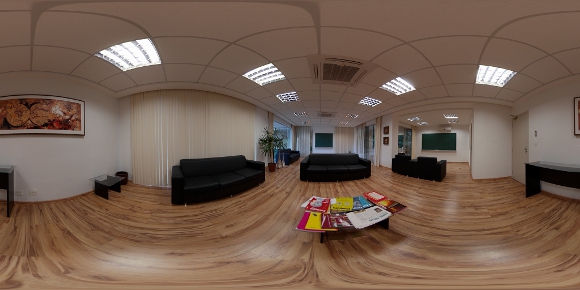
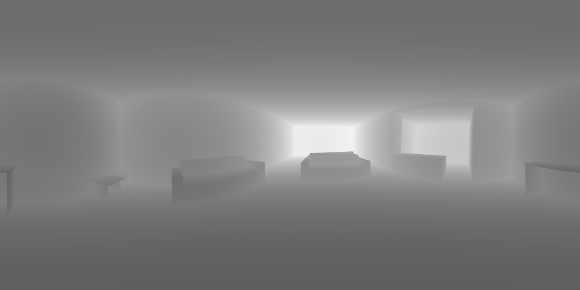
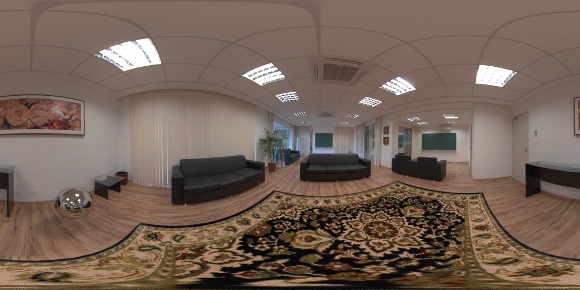
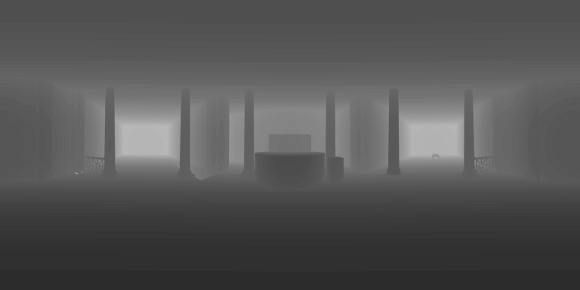
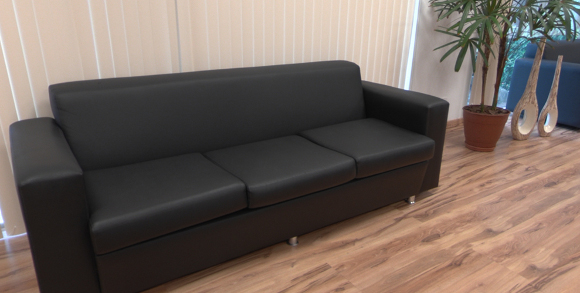
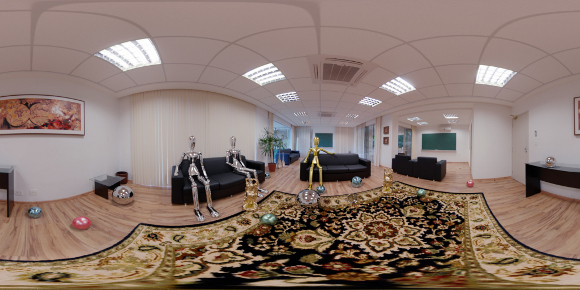
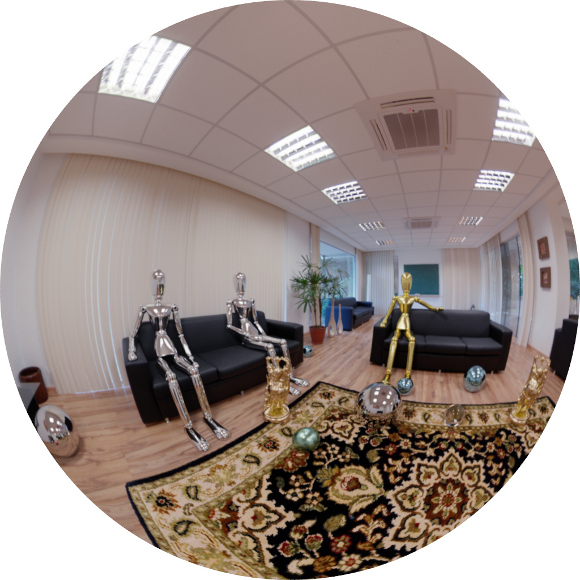
<body><![CDATA[<p><font face="Verdana" size="2"><span class="titlemark">6.3    </span> <a   id="x1-220006.3"></a>Removal of Environment Elements</font></p> <!--l. 130-->    <p ><font face="Verdana" size="2">Modeling can be quite time consuming and a very daunting task. Some elements present in the environment may be undesired in the final composition. One example is the table in the middle of the scene showed along this paper. We inserted a synthetic carpet in the scene in a way that it completely overlays the table in the panorama image space. <!--l. 134--></font>    <p >   <font face="Verdana" size="2">In the figure <a  href="#x1-22001r5">5<!--tex4ht:ref: fig:carpet --></a> you can see the carpet rendered in details. Also notice that we do not need the table to be modeled for the depth map (see the center figure). In the end if the object does not exist in the depth or the light parts of the map, it is as if it was never there. The same technique can be used to handle missing nadir capture (see section <a  href="#x1-90004.2">4.2<!--tex4ht:ref: nadir --></a>). <!--l. 137--></font>    <p >   <hr class="figure">    <div class="figure"  >  <!--l. 139-->    <p ><font face="Verdana" size="2"><a   id="x1-22001r5"> <img  src="/img/revistas/cleiej/v16n3/3a08f10.jpg" alt="PIC"   > </a>      <br> <img  src="/img/revistas/cleiej/v16n3/3a08f11.png" alt="PIC"   >      <br><img  src="/img/revistas/cleiej/v16n3/3a08f12.jpg" alt="PIC"   > <br /> </font>     <div class="caption"  ><font face="Verdana" size="2"><span class="id">Figure&#x00A0;5: </span><span   class="content"><span  class="ptmb7t-">Left: </span>Original captured panorama. <span  class="ptmb7t-">Center: </span>The depth image of the reconstructed environment mesh. <span  class="ptmb7t-">Right:</span> New panorama with synthetic elements. Note the table absent in the depth map and subsequently replaced by a carpet.</span></font></div><!--tex4ht:label?: x1-22001r5 -->                                                                                                                                                                                     <!--l. 145-->    <p >   </div><hr class="endfigure">        ]]></body>
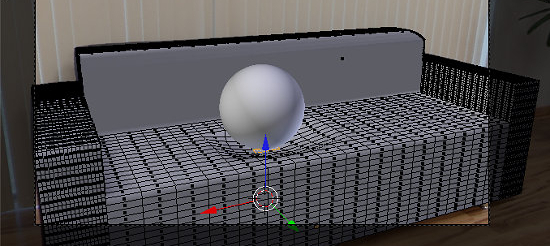
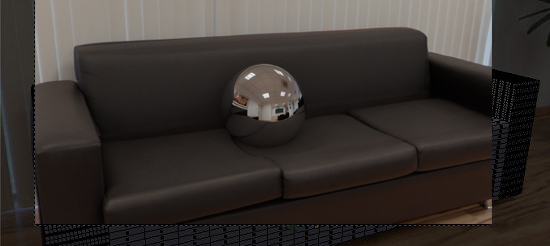
<body><![CDATA[<p><font face="Verdana" size="2"><span class="titlemark">6.4    </span> <a   id="x1-230006.4"></a>Environment Coordinates Projection</font></p> <!--l. 150-->    <p ><hr class="figure">    <div class="figure"  >                                                                                         <!--l. 152-->    <p >                                                                                         <font face="Verdana" size="2">                                                                                         <a   id="x1-23001r6"><img  src="/img/revistas/cleiej/v16n3/3a08f13.jpg" alt="PIC"   ></a>     <br>  <img  src="/img/revistas/cleiej/v16n3/3a08f14.jpg" alt="PIC"   > <br /> </font>     <div class="caption"  ><font face="Verdana" size="2"><span class="id">Figure&#x00A0;6: </span><span   class="content">Deformations of real objects using the environment coordinate texture. The deformed geometry is textured using the texture of the original environment mesh prior to its deformation.</span></font></div><!--tex4ht:label?: x1-23001r6 -->                                                                                                                                                                                     <!--l. 157-->    <p ></div><hr class="endfigure"> <!--l. 159-->    <p >   <font face="Verdana" size="2">We are using a method to transform the environment by deforming the support mesh created using the image as reference. Once the artist is satisfied with the accuracy of the mesh of the object to be transformed, she can store the panorama image space coordinates (UV) of each vertex in the mesh itself. From that point on, any changes in the vertices position can be performed as if affecting the original environment elements. For example, we can simulate a heavy ball (synthetic element) bouncing on a couch (environment element) and animate the deformation of the couch pillows to accommodate the weight of the ball. In the figure&#x00A0;<a  href="#x1-23001r6">6<!--tex4ht:ref: fig:envtex --></a> you can see the couch modeled from the background image and the mesh deformation under the synthesized sphere. <!--l. 161--></font>    <p >   <font face="Verdana" size="2">The renderer should be capable of using this information to always use the light information from the stored coordinates instead of the actual position of the vertices. This works similar to traditional UV unwrapping and texture mapping. In fact this can be used for simple camera mapping (using this as UV and passing a LDR version of the panorama as texture) in cases where the renderer can not be ported to support the augmented reality features implemented in the <span  class="ptmri7t-">ENVPath</span> integrator, section <a  href="#x1-310007.6">7.6<!--tex4ht:ref: sec:envpath --></a>. This can also be used to duplicate the scene elements in new places. A painting can move from one wall to another, the floor tiling can be used to hide out a carpet present in the environment, and so on. <!--l. 163--></font>    <p >   <font face="Verdana" size="2">For the <span  class="ptmri7t-">ENVPath </span>integrator the UV alone is not enough. The vertices in the image space are represented by a direction, but we need to be able to store the original depth of the point as well. Therefore we store in a custom data layer not the UV/direction, but a 3-float vector with the original position of each vertex. We take advantage that both Blender internal file format and the renderer native mesh format can handle custom data. The renderer supports ply as mesh format, so we extended it with <span  class="ptmri7t-">property float wx</span>, <span  class="ptmri7t-">property float wy </span>and <span  class="ptmri7t-">property float wz</span>. The data needs to be stored in the world space (in oppose to the local space) to allow for the mesh to suffer transformations at the object level, not only at the mesh. </font>        ]]></body>
<body><![CDATA[<p><font face="Verdana" size="2"><span class="titlemark">6.5    </span> <a   id="x1-240006.5"></a>Modeling More than Meets the Eye</font></p> <!--l. 167-->    <p ><font face="Verdana" size="2">Even with a static camera we may need to know more information from the scene than what was captured originally in the panorama. For example, if a reflexive sphere is placed inside an open box you expect to see the reflection of the interior of the box in the sphere even if it was not visible from the camera point of view (and consequently is not visible in the pictures taken). Another case is to perform camera traveling in the 3d world. A new camera position can potentially reveal surfaces that were occluded before, and for them there is no information present in the panorama. <!--l. 169--></font>    <p >   <font face="Verdana" size="2">There are three solutions we considered for this problem: (1) If the occluded element is not relevant for the narrative it can simply be ignored completely as if it was never present in the real world (for example, an object lost underneath the sofa, invisible from the camera position); (2) In other cases the artist needs to map a texture to the modeled element and create a material as she would in a normal rendering pipeline. (3) A mesh with the environment coordinate stored can be used to fill some gaps (see section <a  href="#x1-230006.4">6.4<!--tex4ht:ref: envcoords --></a>). <!--l. 1--></font>    <p >        <p><font face="Verdana" size="2"><span class="titlemark">7    </span> <a   id="x1-250007"></a>Rendering Process</font></p> <!--l. 3-->    <p ><font face="Verdana" size="2">The main problem in the traditional method for rendering based in environment maps is that all light scattering computations are performed using the environment map as a set of directional lights. This approach has the drawback that the environment map must be captured in the position where the synthetic objects are to be inserted into the real scene, as did Devebec in his work <span class="cite">&#x00A0;[<a  id="#Xdeb98"> </a><a  href="#Xdeb98">6</a>]</span>. If we need to introduce several objects in different positions of the scene, we will have problems with the positions of the shadows and reflections from objects in the final render (see figure&#x00A0;<a  href="#x1-32003r14">14<!--tex4ht:ref: fig:res1 --></a>). In addition to the above problems, if the map resolution is poor, we also have to get the background of the scene separately through photographs or video, and this makes the panoramic rendering more difficult. <!--l. 6--></font>    <p >   <font face="Verdana" size="2">The proposed framework allows us to model and synthesize a full panoramic scene using a single large resolution environment map as input. This map is used for rendering the background, apply textures and model the environment geometry to keep photo-realistic light scattering effects in the final augmented panoramic scene to be rendered. <!--l. 8--></font>    <p >   <font face="Verdana" size="2">The rendering integrator, <span  class="ptmri7t-">ENVPath</span>, used in this production framework is a modified path tracing algorithm, but with changes in implementation due to new features explored here. It was developed during the course of this research but its specific details are outside the scope of this paper. We will review here some key ideas of the rendering process to help the reader understanding the decisions taken in the production process. The <span  class="ptmri7t-">ENVPath </span>integrator is fully described in <span class="cite">&#x00A0;[<a  id="bXtecreport12"> </a><a  href="#Xtecreport12">15</a>]</span>.                                                                                                                                                                                     <!--l. 11--></font>    <p >        <p><font face="Verdana" size="2"><span class="titlemark">7.1    </span> <a   id="x1-260007.1"></a>Light-depth Environment Maps</font></p> <!--l. 13-->    ]]></body>
<body><![CDATA[<p ><font face="Verdana" size="2">In this paper we introduce a new type of space representation, the <span  class="ptmri7t-">light-depth environment map</span>. This map contains both radiance and the spatial displacement (i.e., depth) of the environment light. The traditional approach for an environment map is to take it as a set of infinite-distant or directional lights. In this new approach the map gives information about the geometry of the environment, so we can consider it as a set of point lights instead of directional lights. This second approach results in a more powerful tool for rendering purposes, because the most common environment maps have their lights originally in a finite distance from the camera, such as an indoor environment map. With the depth we can reconstruct their original location and afford more complex and accurate lighting and reflection computations. This enhanced map is no longer a map of directional lights but a conglomeration of lights points. <!--l. 15--></font>    <p >   <font face="Verdana" size="2">A <span  class="ptmri7t-">light-depth environment map </span>can be built from an <span  class="ptmri7t-">HDR </span>environment map adding the depth channel, as shown in figure&#x00A0;<a  href="#x1-26001r7">7<!--tex4ht:ref: fig:envmap --></a>. The depth channel can be obtained by a special render from the reconstructed environment meshes or also by scanning of the environment or other techniques. <!--l. 17--></font>    <p >   <hr class="figure">    <div class="figure"  >  <!--l. 19-->    <p ><font face="Verdana" size="2"><a   id="x1-26001r7"> <img  src="/img/revistas/cleiej/v16n3/3a08f15.jpg" alt="PIC"   > </a>     <br> <img  src="/img/revistas/cleiej/v16n3/3a08f16.jpg" alt="PIC"   > <br /> </font>     <div class="caption"  ><font face="Verdana" size="2"><span class="id">Figure&#x00A0;7: </span><span   class="content">The left picture shows the radiance channel of the environment and the right one the depth channel used to reconstruct the light positions. Panorama courtesy of Sam Schad, <a href="www.blendedskies.com">www.blendedskies.com</a>.</span></font></div><!--tex4ht:label?: x1-26001r7 -->                                                                                                                                                                                     <!--l. 23-->    <p >   </div><hr class="endfigure"> <!--l. 26-->    <p >   <font face="Verdana" size="2">For the following mathematic notations, a pixel sample from the light-depth environment map is denoted by <img  src="/img/revistas/cleiej/v16n3/3a08335x.png" alt="Map(&#x03C9;i,zi)  "  class="math" >, where <img  src="/img/revistas/cleiej/v16n3/3a08336x.png" alt="&#x03C9;i  "  class="math" > is the direction of the sample light in the map and the scalar value <img  src="/img/revistas/cleiej/v16n3/3a08337x.png" alt="zi  "  class="math" > denotes the distance from the light sample to the light space origin. The position for the light sample in the light space is given by the point <img  src="/img/revistas/cleiej/v16n3/3a08338x.png" alt="zi&#x03C9;i  "  class="math" >. </font>        <p><font face="Verdana" size="2"><span class="titlemark">7.2    </span> <a   id="x1-270007.2"></a>Primitives: Synthetic, Support and Environment Surfaces</font></p> <!--l. 32-->    ]]></body>
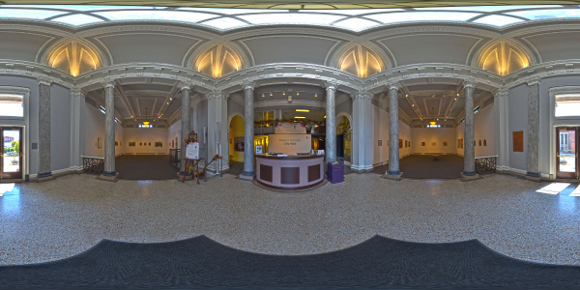
<body><![CDATA[<p ><font face="Verdana" size="2">The rendering integrator used for this work needs a special classification for the different scene primitives. Each primitive category defines different light scattering contributions and visibility tests. Basically we classify the primitives into three types as shown in figure <a  href="#x1-27001r8">8<!--tex4ht:ref: fig:prim --></a>. </font>      <ul class="itemize1">      <li class="itemize"><font face="Verdana" size="2"><span  class="ptmb7t-">Synthetic primitives: </span>the objects that are new to the scene. They do not exist in the original environment. Their      light scattering computation does not differ from a traditional path tracer algorithm.<br  class="newline" />      </font>      </li>      <li class="itemize"><font face="Verdana" size="2"><span  class="ptmb7t-">Support primitives: </span>surfaces present in the original environment that needs to receive shadows and reflections      from the synthetic primitives. Their light scattering computation is not trivial, because it needs to converge to      the original lighting.<br  class="newline" />      </font>      </li>      <li class="itemize"><font face="Verdana" size="2"><span  class="ptmb7t-">Environment primitives: </span>all the surfaces of the original environment that need to be taken into account for      the reflection and shadow computation for the other primitive types. They do not require any light scattering      computation, because their color is computed directly from the light-depth environment map.<br  class="newline" /></font></li>    </ul> <!--l. 40-->    <p >   <hr class="figure">    <div class="figure"  >                                                <div class="center"  > <!--l. 41-->    <p >  <font face="Verdana" size="2">  <!--l. 42--></font>    <p ><font face="Verdana" size="2"><a   id="x1-27001r8"> <img  src="/img/revistas/cleiej/v16n3/3a08f17.png" alt="PIC"   > </a>     <br> <img  src="/img/revistas/cleiej/v16n3/3a08f18.jpg" alt="PIC"   > <br /> </font>     <div class="caption"  ><font face="Verdana" size="2"><span class="id">Figure&#x00A0;8: </span><span   class="content">Primitives classification: synthetic (blue), support (red) and environment (yellow) primitives.</span></font></div><!--tex4ht:label?: x1-27001r8 --> </div>                                                                                                                                                                                     <!--l. 47-->    <p >   </div><hr class="endfigure"> <!--l. 50-->    ]]></body>
<body><![CDATA[<p >   <font face="Verdana" size="2">The level of detail of the environment reconstruction (see section <a  href="#x1-150006">6<!--tex4ht:ref: envmodel --></a>) will depend on how you need the final render to be. For example, in a scene with no objects with glossy reflections, the environment mesh can be simplified to define only the main features that contribute with the lighting of the scene (e.g., windows and ceiling lamps) and a bounding box. Every ray starting at the light origin in world space must intersect with some primitive. Since our primary goal is to render a full panorama image, we need to make sure the light field has the depth of all the rays. Thus it is important to model the environment mesh around all the scene without leaving holes/gaps. </font>        <p><font face="Verdana" size="2"><span class="titlemark">7.3    </span> <a   id="x1-280007.3"></a>Visibility and shadows</font></p> <!--l. 55-->    <p ><font face="Verdana" size="2">For every camera ray that intersects with the scene at a point <img  src="/img/revistas/cleiej/v16n3/3a08339x.png" alt="p "  class="math" > on a surface, the integrator takes a light sample <img  src="/img/revistas/cleiej/v16n3/3a08340x.png" alt="&#x03C9;i  "  class="math" > by importance from the <span  class="ptmri7t-">depth-light map </span>to compute the direct light contribution for point <img  src="/img/revistas/cleiej/v16n3/3a08341x.png" alt="p "  class="math" >. Next, the renderer performs a visibility test to determine if the sampled light is visible or not from the point <img  src="/img/revistas/cleiej/v16n3/3a08342x.png" alt="p "  class="math" >. <!--l. 60--></font>    <p >   <font face="Verdana" size="2">In the traditional rendering scheme, that uses environment maps as directional lights, the visibility test is computed for the ray <img  src="/img/revistas/cleiej/v16n3/3a08343x.png" alt="r(p,LTW (&#x03C9;i))  "  class="math" >, with origin in <img  src="/img/revistas/cleiej/v16n3/3a08344x.png" alt="p "  class="math" > and direction <img  src="/img/revistas/cleiej/v16n3/3a08345x.png" alt="LTW (&#x03C9;i)  "  class="math" > with <img  src="/img/revistas/cleiej/v16n3/3a08346x.png" alt="&#x03C9;i  "  class="math" > in world space. This approach introduces several errors when the object is far away from the point where the light map was captured. Note that all the shadows will have the same orientation, given that only the direction of the light sources is considered. <!--l. 66--></font>    <p >   <hr class="figure">    <div class="figure"  >                                                                                        <font face="Verdana" size="2">                                                                                        <a   id="x1-28003r9"> <img src="/img/revistas/cleiej/v16n3/3a08f19.jpg"> </a><a  id="x1-28001r1"> </a>     <br>  <a   id="x1-28002r2"><img src="/img/revistas/cleiej/v16n3/3a08f20.jpg"> </a>   </font>       <div class="caption"  ><font face="Verdana" size="2"><span class="id">Figure&#x00A0;9: </span><span   class="content"><a  href="#x1-28001r1">9(a)<!--tex4ht:ref: fig:visibility --></a>: <span  class="ptmb7t-">Visibility test</span>. The ray <img  src="/img/revistas/cleiej/v16n3/3a08347x.png" alt="r(p,LTW (&#x03C9;i))  "  class="math" > used by the directional approach is not occluded, so the light <img  src="/img/revistas/cleiej/v16n3/3a08348x.png" alt="li  "  class="math" > contributes for the scattering account of point <img  src="/img/revistas/cleiej/v16n3/3a08349x.png" alt="p "  class="math" >. The ray <img  src="/img/revistas/cleiej/v16n3/3a08350x.png" alt="r(p,li- p)  "  class="math" > used by our light-positional approach is occluded by a synthetic object, thus it gets the correct world-based estimation.<br  class="newline" /><a  href="#x1-28002r2">9(b)<!--tex4ht:ref: fig:reflection --></a>: <span  class="ptmb7t-">Reflection account</span>. The ray <img  src="/img/revistas/cleiej/v16n3/3a08351x.png" alt="r(p,&#x03C9;i)  "  class="math" > intersects the scene at point <img  src="/img/revistas/cleiej/v16n3/3a08352x.png" alt="q "  class="math" >, over the environment mesh. The radiance of <img  src="/img/revistas/cleiej/v16n3/3a08353x.png" alt="q "  class="math" > is stored at <img  src="/img/revistas/cleiej/v16n3/3a08354x.png" alt="qL  "  class="math" > direction in the light-depth map. The correct reflection value is given by <img  src="/img/revistas/cleiej/v16n3/3a08355x.png" alt="qL  "  class="math" >, instead the ray <img  src="/img/revistas/cleiej/v16n3/3a08356x.png" alt="&#x03C9;i  "  class="math" > used in the traditional approach. </span></font></div><!--tex4ht:label?: x1-28003r9 -->                                                                                                                                                                                     <!--l. 79-->    <p >   </div><hr class="endfigure"> <!--l. 81-->    <p >   <font face="Verdana" size="2">Our rendering algorithm works differently. Thanks to the light-depth environment map properties, the visibility test uses the light sample world position and not only its direction. <!--l. 84--></font>    ]]></body>
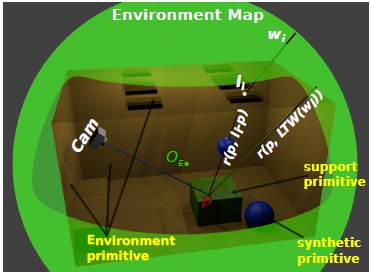
<body><![CDATA[<p >   <font face="Verdana" size="2">The new visibility test use the direction <img  src="/img/revistas/cleiej/v16n3/3a08357x.png" alt="&#x03C9;i  "  class="math" > of the light sample and multiply it by their depth value <img  src="/img/revistas/cleiej/v16n3/3a08358x.png" alt="zi  "  class="math" > obtaining the point <img  src="/img/revistas/cleiej/v16n3/3a08359x.png" alt="zi&#x22C5;&#x03C9;i  "  class="math" > in the coordinate system of the light. The point <img  src="/img/revistas/cleiej/v16n3/3a08360x.png" alt="zi&#x22C5;&#x03C9;i  "  class="math" > is transformed to world space to obtain <img  src="/img/revistas/cleiej/v16n3/3a08361x.png" alt="li = LTW (zi&#x22C5;&#x03C9;i)  "  class="math" >. Thus the calculation of visibility is made for the ray <img  src="/img/revistas/cleiej/v16n3/3a08362x.png" alt="r(p,li- p )  "  class="math" >, with origin <img  src="/img/revistas/cleiej/v16n3/3a08363x.png" alt="p "  class="math" > and direction <img  src="/img/revistas/cleiej/v16n3/3a08364x.png" alt="li- p "  class="math" > as shown in figure <a  href="#x1-28001r1">9(a)<!--tex4ht:ref: fig:visibility --></a>. </font>        <p><font face="Verdana" size="2"><span class="titlemark">7.4    </span> <a   id="x1-290007.4"></a>Reflections</font></p> <!--l. 93-->    <p ><font face="Verdana" size="2">Given a point <img  src="/img/revistas/cleiej/v16n3/3a08365x.png" alt="p "  class="math" > on a surface, the integrator takes a direction <img  src="/img/revistas/cleiej/v16n3/3a08366x.png" alt="&#x03C9;i  "  class="math" > by sampling the surface <span  class="ptmri7t-">BRDF </span>(Bidirectional Reflectance Distribution Function) to add reflection contributions to the point <img  src="/img/revistas/cleiej/v16n3/3a08367x.png" alt="p "  class="math" >. To do this, we compute the scene intersection of the ray <img  src="/img/revistas/cleiej/v16n3/3a08368x.png" alt="r(p,&#x03C9;i)  "  class="math" > with origin <img  src="/img/revistas/cleiej/v16n3/3a08369x.png" alt="p "  class="math" > and direction <img  src="/img/revistas/cleiej/v16n3/3a08370x.png" alt="&#x03C9;i  "  class="math" >. Note that the intersection exists because the environment was completely modeled around the world. If the intersection point <img  src="/img/revistas/cleiej/v16n3/3a08371x.png" alt="q "  class="math" > is on a synthetic or support surface its contribution must to be added to reflection account. Otherwise, if the intersection is with an environment mesh, we transform <img  src="/img/revistas/cleiej/v16n3/3a08372x.png" alt="q "  class="math" > from world space to light space by computing <img  src="/img/revistas/cleiej/v16n3/3a08373x.png" alt="qL = W TL(q)  "  class="math" >. Finally the contribution given by the direction <img  src="/img/revistas/cleiej/v16n3/3a08374x.png" alt="qL  "  class="math" > in the environment map is added to the reflection account. The figure <a  href="#x1-28002r2">9(b)<!--tex4ht:ref: fig:reflection --></a> illustrates this proposal. <!--l. 96--></font>    <p >        <p><font face="Verdana" size="2"><span class="titlemark">7.5    </span> <a   id="x1-300007.5"></a>Environment Texture Coordinates</font></p> <!--l. 98-->    <p ><font face="Verdana" size="2">Environment texture coordinates was implemented to support rendering effect such as the deformation in the original environment by the interaction with synthetic objects. Another application is to copy a texture from one environment region to another. This can be a powerful tool for texturing support meshes on regions where do you do not know the color directly by the environment because they are occluded by other support object. In figure <a  href="#x1-30001r10">10<!--tex4ht:ref: fig:texture --></a> we show the power of this tool to apply deformations on support objects when they interact with synthetic objects. <!--l. 100--></font>    <p >   <hr class="figure">    <div class="figure"  >  <!--l. 102-->    <p ><font face="Verdana" size="2"><a   id="x1-30001r10"><img  src="/img/revistas/cleiej/v16n3/3a08f21.jpg" alt="PIC"   ></a>     <br> <img  src="/img/revistas/cleiej/v16n3/3a08f22.jpg" alt="PIC"   > <br /> </font>     ]]></body>

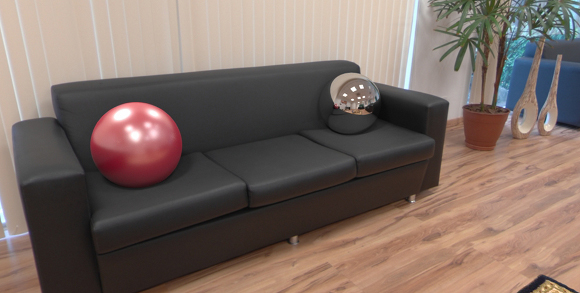
<body><![CDATA[<div class="caption"  ><font face="Verdana" size="2"><span class="id">Figure&#x00A0;10: </span><span   class="content">The spheres on the couch were added to the scene. The couch is real and has been stored on the light-depth map. We deformed the <span  class="ptmri7t-">environment texture coordinates </span>of the couch to simulate the interaction between them. </span>   </font></div><!--tex4ht:label?: x1-30001r10 -->                                                                                                                                                                                     <!--l. 106-->    <p >   </div><hr class="endfigure">        <p><font face="Verdana" size="2"><span class="titlemark">7.6    </span> <a   id="x1-310007.6"></a>ENVPath Integrator: Path Tracing for Light-Depth Environment Maps</font></p> <!--l. 4-->    <p ><font face="Verdana" size="2">We use an implementation of the path tracing algorithm that solves the light equation constructing the path incrementally, starting from the vertex at the camera <img  src="/img/revistas/cleiej/v16n3/3a08375x.png" alt="p0  "  class="math" >. At each vertex <img  src="/img/revistas/cleiej/v16n3/3a08376x.png" alt="pk  "  class="math" >, the <span  class="ptmri7t-">BSDF </span>is sampled to generate a new direction; the next vertex <img  src="/img/revistas/cleiej/v16n3/3a08377x.png" alt="pk+1  "  class="math" > is found by tracing a ray from <img  src="/img/revistas/cleiej/v16n3/3a08378x.png" alt="pk  "  class="math" > in the sampled direction and finding the closest intersection. <!--l. 9--></font>    <p >   <font face="Verdana" size="2">For each vertex <img  src="/img/revistas/cleiej/v16n3/3a08379x.png" alt="pk  "  class="math" > with <img  src="/img/revistas/cleiej/v16n3/3a08380x.png" alt="k = 1,&#x22C5;&#x22C5;&#x22C5;,i- 1  "  class="math" > we compute the radiance scattering at point <img  src="/img/revistas/cleiej/v16n3/3a08381x.png" alt="pk  "  class="math" > along the <img  src="/img/revistas/cleiej/v16n3/3a08382x.png" alt="pk-1- pk  "  class="math" > direction. The scattering contribution for <img  src="/img/revistas/cleiej/v16n3/3a08383x.png" alt="pk  "  class="math" > is computed estimating the direct lighting integral with an appropriate Monte Carlo estimator for the primitive type (synthetic, support or environment surface) of the geometry the vertex <img  src="/img/revistas/cleiej/v16n3/3a08384x.png" alt="pk  "  class="math" > belongs to. <!--l. 14--></font>    <p >   <font face="Verdana" size="2">A path <img  src="/img/revistas/cleiej/v16n3/3a08385x.png" alt="&#x02C9;pi = (p0,&#x22C5;&#x22C5;&#x22C5;,pi)  "  class="math" > can be classified according the nature of its vertices as </font>      <ul class="itemize1">      <li class="itemize"><font face="Verdana" size="2"><span  class="ptmb7t-">Real path: </span>the vertices <img  src="/img/revistas/cleiej/v16n3/3a08386x.png" alt="pk  "  class="math" >, <img  src="/img/revistas/cleiej/v16n3/3a08387x.png" alt="k= 1,&#x22C5;&#x22C5;&#x22C5;,i- 1  "  class="math" > are on support surfaces.      </font>      </li>      <li class="itemize"><font face="Verdana" size="2"><span  class="ptmb7t-">Synthetic path: </span>the vertices <img  src="/img/revistas/cleiej/v16n3/3a08388x.png" alt="pk  "  class="math" >, <img  src="/img/revistas/cleiej/v16n3/3a08389x.png" alt="k= 1,&#x22C5;&#x22C5;&#x22C5;,i- 1  "  class="math" > are on synthetic objects surfaces.      </font>      </li>      <li class="itemize"><font face="Verdana" size="2"><span  class="ptmb7t-">Mixed path: </span>some vertices are on synthetic objects and others on support surfaces.<br  class="newline" /></font></li>    </ul> <!--l. 23-->    <p >   <font face="Verdana" size="2">There is no need to compute any of the real paths for the light. Their contribution is already stored in the original environment map. However, since part of the local scene was modeled (and potentially modified), we need to re-render it for these elements. The computed radiance needs to match the captured value from the environment. We do this by aggregating the radiance of all real paths with same vertex <img  src="/img/revistas/cleiej/v16n3/3a08390x.png" alt="p1  "  class="math" > as direct illumination, discarding the need of considering the light contribution of the subsequent vertices of the paths. <!--l. 28--></font>    <p >   <hr class="figure">    <div class="figure"  >                                                                     <font face="Verdana" size="2">                                                                     <a   id="x1-31001r11"><img src="/img/revistas/cleiej/v16n3/3a08f23.jpg"></a> </font>      ]]></body>
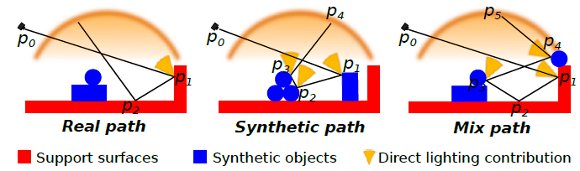
<body><![CDATA[<div class="center"  > <!--l. 29-->    <p > <font face="Verdana" size="2"> <!--l. 30--></font>    <p >      <div class="caption"  ><font face="Verdana" size="2"><span class="id">Figure&#x00A0;11: </span><span   class="content">Path type classification. The yellow cones represent the direct lighting contribution from the vertices <img  src="/img/revistas/cleiej/v16n3/3a08392x.png" alt="pi  "  class="math" > that contributes with the illumination accounts. Vertex without the yellow cones do not contributes for the for the illumination accounts.</span></font></div><!--tex4ht:label?: x1-31001r11 --> </div>                                                                                                                                                                                     <!--l. 35-->    <p >   </div><hr class="endfigure"> <!--l. 37-->    <p >   <font face="Verdana" size="2">The synthetic and mixed light paths are computed in a similar way, taking the individual path vertex light contributions for every vertex of the light path. The difference between them is in the Monte Carlo estimate applied in each case. In the figure (<a  href="#x1-31001r11">11<!--tex4ht:ref: fig:paths-type --></a>) it is possible to see the different light path types and the computations that happens on the corresponding path vertices. <!--l. 42--></font>    <p >   <font face="Verdana" size="2">Because we are using an incremental path construction technique, it is impossible to know the kind of path we have before we are done with it. Thus the classification above is only theoretical. <!--l. 45--></font>    <p >   <font face="Verdana" size="2">For implementation purposes during the incremental path construction we only need to know if the partial path (<img  src="/img/revistas/cleiej/v16n3/3a08393x.png" alt="p0,&#x22C5;&#x22C5;&#x22C5;,pk  "  class="math" >) contains some synthetic vertices or not. This allows us to decide what Monte Carlo estimator we need to use. To do this, we use a boolean variable <img  src="/img/revistas/cleiej/v16n3/3a08394x.png" alt="pt "  class="math" > (<span  class="ptmri7t-">path type</span>) that has a <span  class="ptmri7t-">false </span>value if the partial path does not have synthetic vertices and <span  class="ptmri7t-">true </span>otherwise. </font>        <p><font face="Verdana" size="2"><span class="titlemark">8    </span> <a   id="x1-320008"></a>Results</font></p> <!--l. 3-->    <p ><font face="Verdana" size="2">The rendering time of the proposed algorithm is equivalent as what we can obtain with other physically based rendering algorithm using a scene with the same mesh complexity. Part of the merit of this, is that this is an one-pass solution. There is no need for multiple composition passes. And the rendering solution converges to the final results without &#8217;adjustments&#8217; loops been required like the original Debevec&#8217;s technique <span class="cite">&#x00A0;[<a  id="bXdeb98"> </a><a  href="#Xdeb98">6</a>]</span>. <!--l. 6--></font>    ]]></body>
<body><![CDATA[<p >   <font face="Verdana" size="2">As explained during the paper, the core aspect of this process is to is to mix rendered and captured full panorama images. More specifically the integration of a captured environment and synthetic objects. In the figures <a  href="#x1-32001r12">12<!--tex4ht:ref: fig:carn --></a> and <a  href="#x1-32002r13">13<!--tex4ht:ref: fig:res0 --></a> you can see the synthetic elements integrated with the original panorama. In each case the lighting and shadows of the synthetic elements over the original environment are computed using the light-depth map. <!--l. 8--></font>    <p >   <font face="Verdana" size="2">The mirror ball reflection calculation can be seen in more details in the figure <a  href="#x1-32003r14">14<!--tex4ht:ref: fig:res1 --></a>. This is a comparison between the traditional direction map method and our light-depth map solution. The spheres and the carpet are synthetic and are rendered alike with both methods. But the presence of the original environment meshes makes the reflection to be a continuous between the synthetic (e.g., carpet) and the environment (e.g., wood floor). <!--l. 10--></font>    <p >   <font face="Verdana" size="2">The proper calibration of the scene and the correct shadows help the natural feeling of belonging for the synthetic elements in the scene. In the figure <a  href="#x1-32004r15">15<!--tex4ht:ref: fig:res2 --></a> you can see the spheres and the carpet inserted in the scene. The details are shown in a non panoramic frustum to showcase the correct perspective when seen in a conventional display. <!--l. 12--></font>    <p >   <font face="Verdana" size="2">Finally, we explored camera traveling for a few of our shots. In the figure <a  href="#x1-32005r16">16<!--tex4ht:ref: fig:travel --></a> you can see part of the scene rendered from two different camera positions. The result is satisfactory as long as the support environment is properly modeled. For slight camera shifts this is not even a problem. <!--l. 14--></font>    <p >   <font face="Verdana" size="2">To ensure this frameworks was flexible enough, we explored this pipeline using a panorama captured by a third party. From there we reconstructed the depth, added synthetic elements and produced some images. The satisfying renders are on figure <a  href="#x1-32001r12">12<!--tex4ht:ref: fig:carn --></a>. <!--l. 16--></font>    <p >   <hr class="figure">    <div class="figure"  >                                                                                         <!--l. 18-->    <p ><font face="Verdana" size="2"><a   id="x1-32001r12"><img  src="/img/revistas/cleiej/v16n3/3a08f24.jpg" alt="PIC"   > </a>     <br> <img  src="/img/revistas/cleiej/v16n3/3a08f25.jpg" alt="PIC"   > <br /> </font>     <div class="caption"  ><font face="Verdana" size="2"><span class="id">Figure&#x00A0;12:  </span><span   class="content">Render  images  from  panorama  captured  by  third  party  to  validate  this  framework.  Original  captured panorama courtesy of Sam Schad, <a href="www.blendedskies.com">www.blendedskies.com</a>.</span></font></div><!--tex4ht:label?: x1-32001r12 -->                                                                               <!--l. 23-->    ]]></body>
<body><![CDATA[<p >   </div><hr class="endfigure"> <!--l. 25-->    <p >   <hr class="figure">    <div class="figure"  > <!--l. 27-->    <p ><font face="Verdana" size="2"><a   id="x1-32002r13"><img  src="/img/revistas/cleiej/v16n3/3a08f26.jpg" alt="PIC"   ></a> <br /> <img  src="/img/revistas/cleiej/v16n3/3a08f27.jpg" alt="PIC"   >      <br> <img  src="/img/revistas/cleiej/v16n3/3a08f28.jpg" alt="PIC"   > <br /> </font>     <div class="caption"  ><font face="Verdana" size="2"><span class="id">Figure&#x00A0;13: </span><span   class="content">The top image is a full panoramic render of the augmented reality scene. The bottom images show the same scene rendered with fisheye lens.</span></font></div><!--tex4ht:label?: x1-32002r13 -->                                                                                                                                                                                     <!--l. 33-->    <p >   </div><hr class="endfigure"> <!--l. 36-->    <p >   <hr class="figure">    <div class="figure"  > <!--l. 38-->    <p >                                                                              <font face="Verdana" size="2">                                                                              <a   id="x1-32003r14"> <img  src="/img/revistas/cleiej/v16n3/3a08f29.jpg" alt="PIC"   ></a>     ]]></body>
<body><![CDATA[<br> <img  src="/img/revistas/cleiej/v16n3/3a08f30.jpg" alt="PIC"   > <br /> </font>     <div class="caption"  ><font face="Verdana" size="2"><span class="id">Figure&#x00A0;14: </span><span   class="content">Comparison between reflections using the panorama as an directional environment map (up) and using the panorama as an environment map with the depth channel (light-depth map) (down).</span></font></div><!--tex4ht:label?: x1-32003r14 -->                                                                                                                                                                                     <!--l. 42-->    <p >   </div><hr class="endfigure"> <!--l. 44-->    <p >   <hr class="figure">    <div class="figure"  > <!--l. 46-->    <p >                                                                              <font face="Verdana" size="2">                                                                              <a   id="x1-32004r15"> <img  src="/img/revistas/cleiej/v16n3/3a08f31.jpg" alt="PIC"   ></a>     <br> <img  src="/img/revistas/cleiej/v16n3/3a08f32.jpg" alt="PIC"   > <br /> </font>     <div class="caption"  ><font face="Verdana" size="2"><span class="id">Figure&#x00A0;15: </span><span   class="content">Shadows using light-depth maps. The red ball has different shadows directions than the blue ball.</span></font></div><!--tex4ht:label?: x1-32004r15 -->                                                                                                                                                                                     <!--l. 51-->    <p >   </div><hr class="endfigure"> <!--l. 54-->    <p >   <hr class="figure">    ]]></body>
<body><![CDATA[<div class="figure"  > <!--l. 56-->    <p >                                                                                       <font face="Verdana" size="2">                                                                                       <a   id="x1-32005r16"> <img  src="/img/revistas/cleiej/v16n3/3a08f33.jpg" alt="PIC"   ></a>     <br> <img  src="/img/revistas/cleiej/v16n3/3a08f34.jpg" alt="PIC"   > <br /> </font>     <div class="caption"  ><font face="Verdana" size="2"><span class="id">Figure&#x00A0;16: </span><span   class="content">Detail of the camera traveling effect. A door partially visible in the left image is occluded by the wall in the right one. <span  class="ptmb7t-">Up: </span>Camera positioned where the environment was captured. <span  class="ptmb7t-">Down: </span>The camera is displaced from the environment origin. </span></font></div><!--tex4ht:label?: x1-32005r16 -->                                                                                                                                                                                     <!--l. 60-->    <p >   </div><hr class="endfigure">        <p><font face="Verdana" size="2"><span class="titlemark">9    </span> <a   id="x1-330009"></a>Conclusion</font></p> <!--l. 4-->    <p ><font face="Verdana" size="2">We have presented a general framework for adding new objects to full panoramic scenes based on illumination captured from real world and reconstructed depth. To attest the feasibility of the proposed framework we applied it into the production of realistic immersive scenes for panoramic and conventional displays. <!--l. 6--></font>    <p >   <font face="Verdana" size="2">A key point of our method, until now unexplored to those means, is the use of the light positions in the environment map instead of the directional approach, to get the correct shadows and reflections effects for all the synthetic objects along the scene. <!--l. 8--></font>    <p >   <font face="Verdana" size="2">Among the possible improvements, we are interested on studying techniques to recover the light positions for assembling the light-depth environment map and semi-automatic environment mesh construction for the cases where we can capture a point cloud of the environment geometry. <!--l. 10--></font>    <p >   <font face="Verdana" size="2">A shortcoming of this solution is the lack of freedom in the camera movement within the rebuilt scene. This is a limitation of using a single captured panorama. Even without moving the camera there are blind spots due to objects being occluded from the camera point of view. This is more evident when the missing information was supposed to be reflected by one of the synthetic objects. <!--l. 12--></font>    ]]></body>
<body><![CDATA[<p >   <font face="Verdana" size="2">As a further development of this project we want to explore the capture of multiple panoramas. We are working on determining an optimal number of captures to fully represent a scene. This will allow more complex camera traveling without compromising too much of the performance. Additionally, this prevents the abuse of copying the environment texture to complete unknown environment elements. The environment texture copy (and paste) solution is better fit for applying soft deformations on the environment elements. <!--l. 15--></font>    <p >   <font face="Verdana" size="2">Finally, we were quite pleased with the results of this framework to produce content for conventional displays. Camera panning and traveling works regardless of the camera frustum and field of view. For non-panoramic frustums camera, zooming can also be used to deliver the essential camera toolset for traditional filmmaking. <!--l. 2--></font>    <p >        <p><font face="Verdana" size="2"><a   id="x1-340009"></a>References</font></p> <!--l. 2-->    <p >         <div class="thebibliography">         <p ><font face="Verdana" size="2"><span class="biblabel">   <a   href="#bXzang11">[1]</a><span class="bibsp">&#x00A0;&#x00A0;&#x00A0;</span></span><a   id="Xzang11"> </a>A.&#x00A0;R.  Zang  and  L.&#x00A0;Velho,  &#8220;Um  framework  para  renderizações  foto-realistas  de  cenas  com  realidade     aumentada,&#8221; in <span  class="ptmri7t-">XXXVII Latin American Conference of Informatics (CLEI)</span>, Quito, 2011.     </font>     </p>         <p ><font face="Verdana" size="2"><span class="biblabel">   <a   href="#bXarlux">[2]</a><span class="bibsp">&#x00A0;&#x00A0;&#x00A0;</span></span><a   id="Xarlux"> </a>&#8212;&#8212;, &#8220;Arluxrender project,&#8221; in <span  class="ptmri7t-"><a href="http://www.impa.br/~zang/arlux">http://www.impa.br/<img  src="/img/revistas/cleiej/v16n3/3a08395x.png" alt="~ "  class="math" >zang/arlux</a></span>.    Visgraf, 2011.     </font>     </p>         <p ><font face="Verdana" size="2"><span class="biblabel">   <a   href="#bXHOFFMAN84">[3]</a><span class="bibsp">&#x00A0;&#x00A0;&#x00A0;</span></span><a   id="XHOFFMAN84"> </a>G.&#x00A0;S. Miller and C.&#x00A0;R. Hoffmanm, &#8220;Illumination and reflection maps: Simulated objects in simulated and     real environments,&#8221; in <span  class="ptmri7t-">Curse Notes for Advanced Computer Graphics Animation</span>.    SIGGRAPH, 1984.     </font>     </p>         <p ><font face="Verdana" size="2">   <a   href="#bXWILLIAMS83"><span class="biblabel">     [4]<span class="bibsp">&#x00A0;&#x00A0;&#x00A0;</span></span><a   id="XWILLIAMS83"> </a>L.&#x00A0;Williams, &#8220;Pyramidal parametrics,&#8221; in <span  class="ptmri7t-">Proceedings of the 10th annual conference on Computer graphics</span>     <span  class="ptmri7t-">and interactive techniques</span>.    ACM-SIGGRAPH, 1983, pp. vol 17(3), pp. 1&#8211;11, ISBN:0&#8211;89 791&#8211;109&#8211;1.     </font>     </p>         ]]></body>
<body><![CDATA[<p ><font face="Verdana" size="2"><span class="biblabel">   <a   href="#bXDeb97">[5]</a><span class="bibsp">&#x00A0;&#x00A0;&#x00A0;</span></span><a   id="XDeb97"> </a>P.&#x00A0;E.   Debevec   and   J.&#x00A0;Malik,   &#8220;Recovering   high   dynamic   range   radiance   maps   from   photographs.&#8221;     SIGGRAPH, 1997, pp. pp. 369&#8211;378. </font>     </p>         <p ><font face="Verdana" size="2"><span class="biblabel">   <a   href="#bXdeb98">[6]</a><span class="bibsp">&#x00A0;&#x00A0;&#x00A0;</span></span><a   id="Xdeb98"> </a>P.&#x00A0;E. Debevec, &#8220;Rendering synthetic objects into real scenes: Bridging traditional and image-based graphics     with global illumination and high dynamic range photography.&#8221;    SIGGRAPH, 1998, pp. pp. 189&#8211;198.     </font>                                                                                                                                                                                         </p>         <p ><font face="Verdana" size="2"><span class="biblabel">   <a   href="#bXKarsch:SA2011">[7]</a><span class="bibsp">&#x00A0;&#x00A0;&#x00A0;</span></span><a   id="XKarsch:SA2011"> </a>D.&#x00A0;F.  K.&#x00A0;Karsch,  V.&#x00A0;Hedau  and  D.&#x00A0;Hoiem,  &#8220;Rendering  synthetic  objects  into  legacy  photographs,&#8221;  in     <span  class="ptmri7t-">Proceedings of the 2011 SIGGRAPH Asia Conference</span>.    pp. 157:1&#8211;157:12: ACM, New York, NY, USA, 2011.     </font>     </p>         <p ><font face="Verdana" size="2"><span class="biblabel">   <a   href="#bXfelinto10">[8]</a><span class="bibsp">&#x00A0;&#x00A0;&#x00A0;</span></span><a   id="Xfelinto10"> </a>P.&#x00A0;D.  Bourke  and  D.&#x00A0;Q.  Felinto,  &#8220;Blender  and  immersive  gaming  in  a  hemispherical  dome,&#8221;  in  <span  class="ptmri7t-">GSTF</span>     <span  class="ptmri7t-">International Journal on Computing (JoC)</span>, 2010, pp. Vol. 1, No. 1, ISSN: 2010&#8211;2283.     </font>     </p>         <p ><font face="Verdana" size="2"><span class="biblabel">   <a   href="#bXbge">[9]</a><span class="bibsp">&#x00A0;&#x00A0;&#x00A0;</span></span><a   id="Xbge"> </a>D.&#x00A0;Felinto and M.&#x00A0;Pan, <span  class="ptmri7t-">Game Development with Blender</span>.    Cengage Learning, 1st ed., 2013.     </font>     </p>         <p ><font face="Verdana" size="2"><span class="biblabel">  <a   href="#bXfelinto09">[10]</a><span class="bibsp">&#x00A0;&#x00A0;&#x00A0;</span></span><a   id="Xfelinto09"> </a>D.&#x00A0;Q.  Felinto,  &#8220;Domos  imersivos  em  arquitetura,&#8221;  in  <span  class="ptmri7t-">Bachelor  thesis  at  the  Escola  de  Arquitetura  e</span>     <span  class="ptmri7t-">Urbanismo</span>.    Niterói: Universidade Federal Fluminense, 2010.     </font>     </p>         <p ><font face="Verdana" size="2"><span class="biblabel">  <a   href="#bXkinectfusion">[11]</a><span class="bibsp">&#x00A0;&#x00A0;&#x00A0;</span></span><a   id="Xkinectfusion"> </a>R.&#x00A0;A. Newcombe, A.&#x00A0;J. Davison, S.&#x00A0;Izadi, P.&#x00A0;Kohli, O.&#x00A0;Hilliges, J.&#x00A0;Shotton, D.&#x00A0;Molyneaux, S.&#x00A0;Hodges,     D.&#x00A0;Kim, and A.&#x00A0;Fitzgibbon, &#8220;Kinectfusion: Real-time dense surface mapping and tracking.&#8221;     </font>     </p>         <p ><font face="Verdana" size="2"><span class="biblabel">  <a   href="#bXlivedense">[12]</a><span class="bibsp">&#x00A0;&#x00A0;&#x00A0;</span></span><a   id="Xlivedense"> </a>R.&#x00A0;A. Newcombe and A.&#x00A0;J. Davison, &#8220;Live dense reconstruction with a single moving camera,&#8221; in <span  class="ptmri7t-">IEEE</span>     <span  class="ptmri7t-">Conference on Computer Vision and pattern Recognition</span>, 2010.     </font>     </p>         <p ><font face="Verdana" size="2"><span class="biblabel">  <a   href="#bXpanorama">[13]</a><span class="bibsp">&#x00A0;&#x00A0;&#x00A0;</span></span><a   id="Xpanorama"> </a>P.&#x00A0;Kuliyev, &#8220;High dynamic range imaging for computer imagery applications - a comparison of acquisition     techniques,&#8221;  in  <span  class="ptmri7t-">Bachelor  thesis  at  the  Department  of  Imaging  Sciences  and  Media  Technology</span>.      Cologne:     University of Applied Sciences, 2009. </font>     </p>         <p ><font face="Verdana" size="2"><span class="biblabel">  <a   href="#bXorange">[14]</a><span class="bibsp">&#x00A0;&#x00A0;&#x00A0;</span></span><a   id="Xorange"> </a>R.&#x00A0;J. Rost and B.&#x00A0;Licea-Kane, <span  class="ptmri7t-">OpenGL Shading Language</span>.    The Khronos Group, 3rd ed., 2010.     </font>     </p>         ]]></body>
<body><![CDATA[<p ><font face="Verdana" size="2"><span class="biblabel">  <a   href="#bXtecreport12">[15]</a><span class="bibsp">&#x00A0;&#x00A0;&#x00A0;</span></span><a   id="Xtecreport12"> </a>D.&#x00A0;F.  A.&#x00A0;Zang  and  L.&#x00A0;Velho,  &#8220;Rendering  synthetic  objects  into  full  panoramic  scenes  using  light-depth     maps,&#8221; Visgraf Technical Report (submitted to GRAPP 2013), Tech. Rep.     </font> </p>     </div>           ]]></body><back>
<ref-list>
<ref id="B1">
<label>(1)</label><nlm-citation citation-type="confpro">
<person-group person-group-type="author">
<name>
<surname><![CDATA[Zang]]></surname>
<given-names><![CDATA[A. R.]]></given-names>
</name>
<name>
<surname><![CDATA[Velho]]></surname>
<given-names><![CDATA[L]]></given-names>
</name>
</person-group>
<article-title xml:lang="pt"><![CDATA[Um framework para renderizações foto-realistas de cenas com realidade aumentada]]></article-title>
<source><![CDATA[]]></source>
<year></year>
<conf-name><![CDATA[XXXVII Latin American Conference of Informatics (CLEI)]]></conf-name>
<conf-date>2011</conf-date>
<conf-loc>Quito </conf-loc>
</nlm-citation>
</ref>
<ref id="B2">
<label>(2)</label><nlm-citation citation-type="">
<person-group person-group-type="author">
<name>
<surname><![CDATA[Zang]]></surname>
<given-names><![CDATA[A. R]]></given-names>
</name>
<name>
<surname><![CDATA[Velho]]></surname>
<given-names><![CDATA[L]]></given-names>
</name>
</person-group>
<article-title xml:lang="en"><![CDATA[Arluxrender project]]></article-title>
<source><![CDATA[]]></source>
<year>2011</year>
</nlm-citation>
</ref>
<ref id="B3">
<label>(3)</label><nlm-citation citation-type="">
<person-group person-group-type="author">
<name>
<surname><![CDATA[Miller]]></surname>
<given-names><![CDATA[G. S]]></given-names>
</name>
<name>
<surname><![CDATA[Hoffmann]]></surname>
<given-names><![CDATA[C. R.]]></given-names>
</name>
</person-group>
<article-title xml:lang="en"><![CDATA[Illumination and reflection maps:: Simulated objects in simulated and real environments,]]></article-title>
<source><![CDATA[Curse Notes for Advanced Computer Graphics Animation.]]></source>
<year>1984</year>
</nlm-citation>
</ref>
<ref id="B4">
<label>(4)</label><nlm-citation citation-type="journal">
<person-group person-group-type="author">
<name>
<surname><![CDATA[Williams]]></surname>
<given-names><![CDATA[L]]></given-names>
</name>
</person-group>
<article-title xml:lang="en"><![CDATA[Pyramidal parametrics]]></article-title>
<source><![CDATA[Proceedings of the 10th annual conference on Computer graphics and interactive techniques. ACM-SIGGRAPH]]></source>
<year>1983</year>
<volume>17</volume>
<numero>3</numero>
<issue>3</issue>
<page-range>1-11</page-range></nlm-citation>
</ref>
<ref id="B5">
<label>(5)</label><nlm-citation citation-type="">
<person-group person-group-type="author">
<name>
<surname><![CDATA[Debevec]]></surname>
<given-names><![CDATA[P. E]]></given-names>
</name>
<name>
<surname><![CDATA[Malik]]></surname>
<given-names><![CDATA[J]]></given-names>
</name>
</person-group>
<article-title xml:lang="en"><![CDATA['Recovering high dynamic range radiance maps from photographs]]></article-title>
<collab>SIGGRAPH</collab>
<source><![CDATA[]]></source>
<year>1997</year>
<page-range>369-378</page-range></nlm-citation>
</ref>
<ref id="B6">
<label>(6)</label><nlm-citation citation-type="">
<person-group person-group-type="author">
<name>
<surname><![CDATA[Debevec]]></surname>
<given-names><![CDATA[P. E]]></given-names>
</name>
</person-group>
<article-title xml:lang="en"><![CDATA[Rendering synthetic objects into real scenes: Bridging traditional and image-based graphics with global illumination and high dynamic range photography]]></article-title>
<collab>SIGGRAPH</collab>
<source><![CDATA[]]></source>
<year>1998</year>
<page-range>189-198</page-range></nlm-citation>
</ref>
<ref id="B7">
<label>(7)</label><nlm-citation citation-type="confpro">
<person-group person-group-type="author">
<name>
<surname><![CDATA[Karsch]]></surname>
<given-names><![CDATA[D. F. K]]></given-names>
</name>
<name>
<surname><![CDATA[Hedau]]></surname>
<given-names><![CDATA[V]]></given-names>
</name>
<name>
<surname><![CDATA[Hoiem]]></surname>
<given-names><![CDATA[D]]></given-names>
</name>
</person-group>
<article-title xml:lang="en"><![CDATA[Rendering synthetic objects into legacy photographs]]></article-title>
<source><![CDATA[]]></source>
<year></year>
<conf-name><![CDATA[ Proceedings of the 2011 SIGGRAPH Asia Conference]]></conf-name>
<conf-date>2011</conf-date>
<conf-loc>New York </conf-loc>
</nlm-citation>
</ref>
<ref id="B8">
<label>(8)</label><nlm-citation citation-type="journal">
<person-group person-group-type="author">
<name>
<surname><![CDATA[Bourke]]></surname>
<given-names><![CDATA[P. D.]]></given-names>
</name>
<name>
<surname><![CDATA[Felinto]]></surname>
<given-names><![CDATA[D. Q.]]></given-names>
</name>
</person-group>
<article-title xml:lang="en"><![CDATA[Blender and immersive gaming in a hemispherical dome]]></article-title>
<source><![CDATA[GSTF International Journal on Computing (JoC)]]></source>
<year>2010</year>
<volume>1</volume>
<numero>1</numero>
<issue>1</issue>
</nlm-citation>
</ref>
<ref id="B9">
<label>(9)</label><nlm-citation citation-type="">
<person-group person-group-type="author">
<name>
<surname><![CDATA[Felinto]]></surname>
<given-names><![CDATA[D]]></given-names>
</name>
<name>
<surname><![CDATA[Pan]]></surname>
<given-names><![CDATA[M]]></given-names>
</name>
</person-group>
<article-title xml:lang="en"><![CDATA[Game Development with Blender]]></article-title>
<collab>Cengage Learning</collab>
<source><![CDATA[]]></source>
<year>2013</year>
</nlm-citation>
</ref>
<ref id="B10">
<label>(10)</label><nlm-citation citation-type="">
<person-group person-group-type="author">
<name>
<surname><![CDATA[Felinto]]></surname>
<given-names><![CDATA[D. Q]]></given-names>
</name>
</person-group>
<article-title xml:lang="en"><![CDATA[Domos imersivos em arquitetura]]></article-title>
<collab>Niterói: Universidade Federal Fluminense</collab>
<source><![CDATA[Bachelor thesis at the Escola de Arquitetura e Urbanismo]]></source>
<year>2010</year>
</nlm-citation>
</ref>
<ref id="B11">
<label>(11)</label><nlm-citation citation-type="">
<person-group person-group-type="author">
<name>
<surname><![CDATA[Newcombe]]></surname>
<given-names><![CDATA[R. A]]></given-names>
</name>
<name>
<surname><![CDATA[Davison]]></surname>
<given-names><![CDATA[A. J]]></given-names>
</name>
<name>
<surname><![CDATA[Izadi]]></surname>
<given-names><![CDATA[S.]]></given-names>
</name>
<name>
<surname><![CDATA[Kohli]]></surname>
<given-names><![CDATA[P]]></given-names>
</name>
<name>
<surname><![CDATA[Hilliges]]></surname>
<given-names><![CDATA[O]]></given-names>
</name>
<name>
<surname><![CDATA[Shotton]]></surname>
<given-names><![CDATA[J]]></given-names>
</name>
<name>
<surname><![CDATA[Molyneaux]]></surname>
<given-names><![CDATA[D]]></given-names>
</name>
<name>
<surname><![CDATA[Hodges]]></surname>
<given-names><![CDATA[S]]></given-names>
</name>
<name>
<surname><![CDATA[Kim]]></surname>
<given-names><![CDATA[D]]></given-names>
</name>
<name>
<surname><![CDATA[Fitzgibbon]]></surname>
<given-names><![CDATA[A]]></given-names>
</name>
</person-group>
<article-title xml:lang="en"><![CDATA['Kinectfusion: Real-time dense surface mapping and tracking]]></article-title>
<source><![CDATA[]]></source>
<year></year>
</nlm-citation>
</ref>
<ref id="B12">
<label>(12)</label><nlm-citation citation-type="confpro">
<person-group person-group-type="author">
<name>
<surname><![CDATA[Newcombe]]></surname>
<given-names><![CDATA[R. A]]></given-names>
</name>
<name>
<surname><![CDATA[Davison]]></surname>
<given-names><![CDATA[A. J]]></given-names>
</name>
</person-group>
<article-title xml:lang="en"><![CDATA[Live dense reconstruction with a single moving camera]]></article-title>
<source><![CDATA[]]></source>
<year></year>
<conf-name><![CDATA[ IEEE Conference on Computer Vision and pattern Recognition]]></conf-name>
<conf-date>2010</conf-date>
<conf-loc> </conf-loc>
</nlm-citation>
</ref>
<ref id="B13">
<label>(13)</label><nlm-citation citation-type="confpro">
<person-group person-group-type="author">
<name>
<surname><![CDATA[Kuliyev]]></surname>
<given-names><![CDATA[P]]></given-names>
</name>
</person-group>
<article-title xml:lang="en"><![CDATA[High dynamic range imaging for computer imagery applications - a comparison of acquisition techniques]]></article-title>
<source><![CDATA[]]></source>
<year></year>
<conf-name><![CDATA[ Bachelor thesis at the Department of Imaging Sciences and Media Technology. Cologne: University of Applied Sciences]]></conf-name>
<conf-date>2009</conf-date>
<conf-loc> </conf-loc>
</nlm-citation>
</ref>
<ref id="B14">
<label>(14)</label><nlm-citation citation-type="">
<person-group person-group-type="author">
<name>
<surname><![CDATA[Rost]]></surname>
<given-names><![CDATA[R. J.]]></given-names>
</name>
<name>
<surname><![CDATA[Licea-Kane]]></surname>
<given-names><![CDATA[B.]]></given-names>
</name>
</person-group>
<article-title xml:lang="en"><![CDATA[OpenGL Shading Language]]></article-title>
<collab>The Khronos Group</collab>
<source><![CDATA[]]></source>
<year>2010</year>
<edition>3</edition>
</nlm-citation>
</ref>
<ref id="B15">
<label>(15)</label><nlm-citation citation-type="">
<person-group person-group-type="author">
<name>
<surname><![CDATA[Zang]]></surname>
<given-names><![CDATA[D. F. A]]></given-names>
</name>
<name>
<surname><![CDATA[Velho]]></surname>
<given-names><![CDATA[L]]></given-names>
</name>
</person-group>
<article-title xml:lang="en"><![CDATA[Rendering synthetic objects into full panoramic scenes using light-depth maps]]></article-title>
<collab>GRAPP</collab>
<source><![CDATA[]]></source>
<year>2013</year>
</nlm-citation>
</ref>
</ref-list>
</back>
</article>